GA4 eCommerce Tracking for Shopify Stores

Standard

GA4 is the latest version of Google Analytics, and it provides advanced eCommerce tracking capabilities for Shopify stores. With GA4, Shopify store owners can gain more detailed insights into customer behavior, track user behavior across multiple platforms and devices, and make data-driven decisions to optimize their eCommerce strategy.

One of the key features of GA4 eCommerce tracking is enhanced eCommerce tracking. This allows store owners to gain a deeper understanding of customer behavior, such as how customers interact with products, add them to their cart, and complete purchases. With this information, store owners can optimize their product offerings, pricing, and checkout process to increase sales.

GA4 also provides cross-platform tracking, which means that store owners can track user behavior across multiple platforms and devices, including desktops, mobile devices, and even offline interactions. This provides a more comprehensive view of customer behavior and allows store owners to optimize their eCommerce strategy across all touchpoints.

In addition, GA4 takes a user-centric approach to tracking, which means that it tracks individual users across multiple sessions and devices. This provides a more holistic view of customer behavior and allows store owners to gain insights into customer lifetime value and retention.

GA4 also allows store owners to track custom events, such as clicks on specific buttons, form submissions, and video views. This provides additional insights into how customers interact with a website and helps store owners to optimize the user experience.

Another important aspect of GA4 is its focus on data privacy. GA4 is designed with data privacy in mind, providing better control over data collection and processing. This helps store owners to comply with data privacy regulations and build customer trust.

GA4 also offers a more intuitive user interface, making it easier for store owners to navigate and analyze their data. Store owners can create custom reports and dashboards, which can be used to track key performance indicators (KPIs) and identify areas for optimization.

One of the biggest advantages of GA4 eCommerce tracking for Shopify stores is its ability to provide more accurate data. GA4 uses advanced tracking capabilities and data modeling techniques to provide more accurate data, which helps store owners to make more informed decisions about their eCommerce strategy.

Overall, GA4 eCommerce tracking provides Shopify store owners with more comprehensive insights into customer behavior, allowing them to optimize their eCommerce strategy and improve the customer experience. By integrating GA4 with their Shopify store, store owners can gain a deeper understanding of customer behavior across all touchpoints and make data-driven decisions to increase sales and grow their business.

Here are some of the key features of GA4 eCommerce tracking for Shopify stores:

Enhanced eCommerce Tracking: GA4 provides more detailed insights into customer behavior, such as how customers interact with products, add them to their cart, and complete purchases. This allows store owners to gain a deeper understanding of customer behavior and optimize their eCommerce strategy accordingly.

Cross-Platform Tracking: GA4 allows store owners to track user behavior across multiple platforms and devices, including desktops, mobile devices, and even offline interactions. This helps store owners to better understand the customer journey and optimize their eCommerce strategy across all touchpoints.

Custom Event Tracking: GA4 allows store owners to track custom events, such as clicks on specific buttons, form submissions, and video views. This provides additional insights into how customers interact with a website and helps store owners to optimize the user experience.

User-Centric Approach: GA4 takes a user-centric approach to tracking, rather than a session-centric approach. This means that GA4 tracks individual users across multiple sessions and devices, providing a more holistic view of customer behavior.

Data Privacy: GA4 is designed with data privacy in mind, providing better control over data collection and processing. This helps store owners to comply with data privacy regulations and build customer trust.

Overall, GA4 eCommerce tracking provides Shopify store owners with more comprehensive insights into customer behavior, allowing them to optimize their eCommerce strategy and improve the customer experience. By integrating GA4 with their Shopify store, store owners can gain a deeper understanding of customer behavior across all touchpoints and make data-driven decisions to increase sales and grow their business.

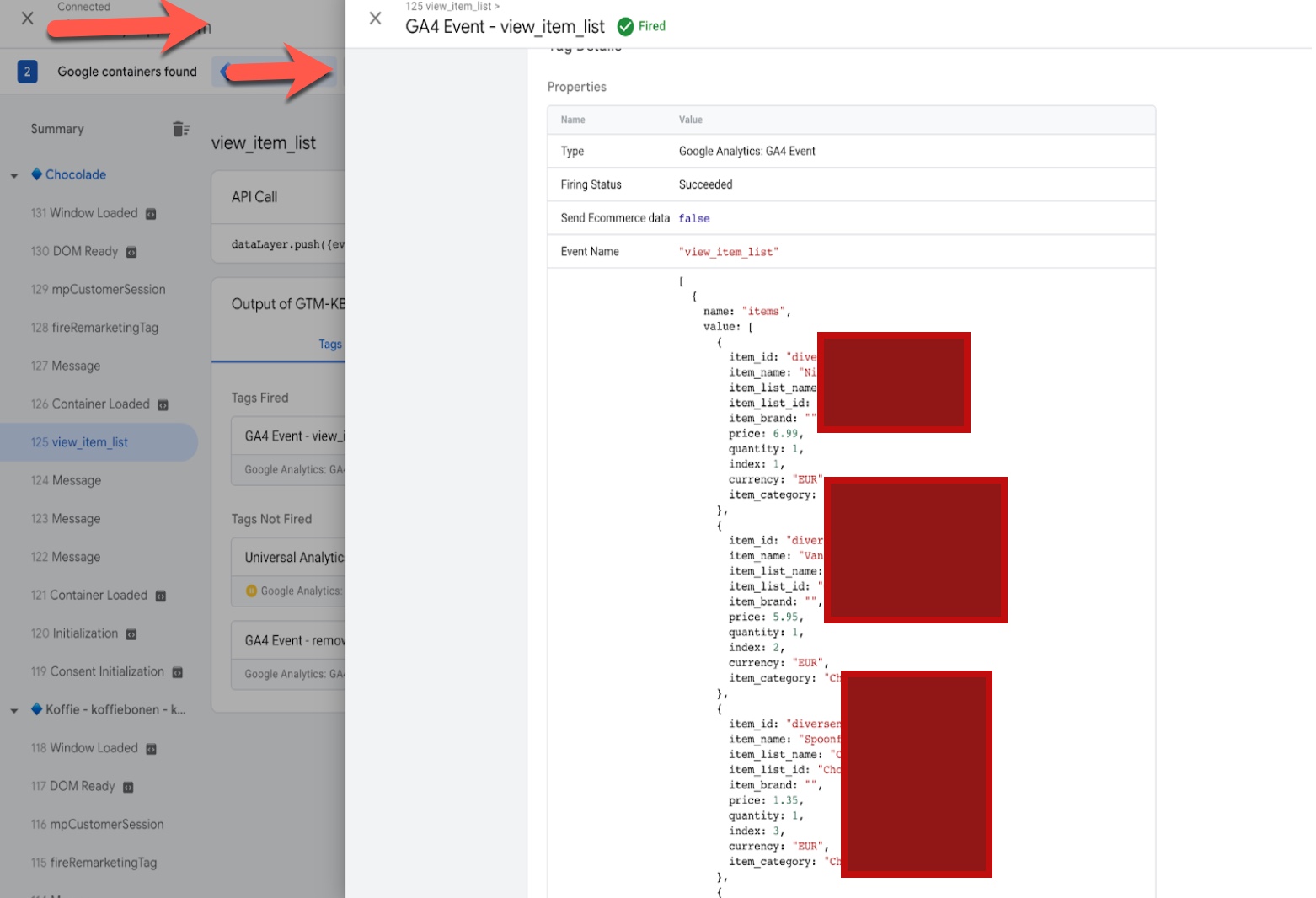
To set up GA4 eCommerce tracking on Shopify “view_item_list”, you will need to add the necessary code to your product collection pages. This code includes the event parameters for the “view_item_list” event, such as the event category and the product information.
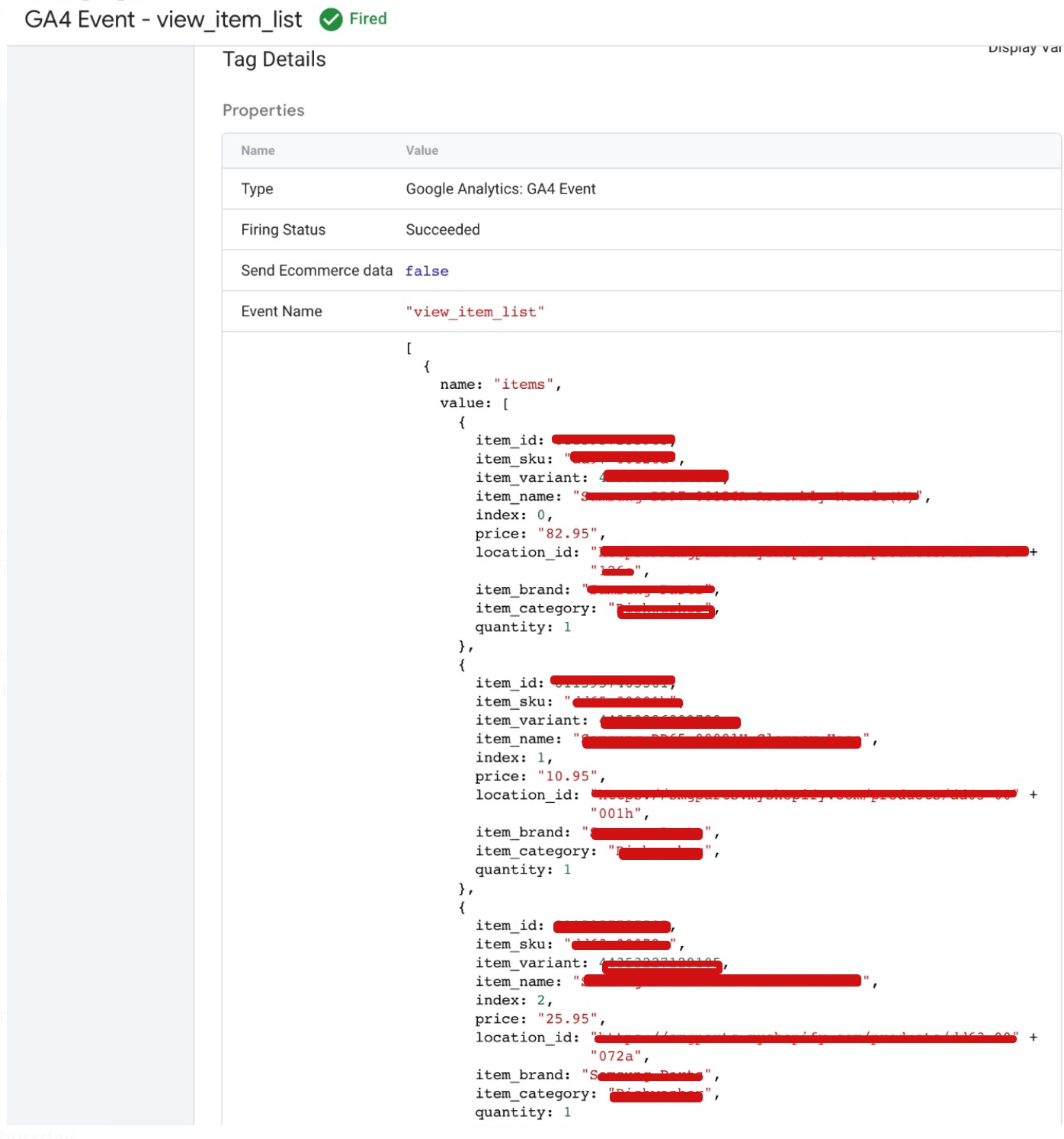
Shopify ecommerce tracking GA4

Shopify GA4 enhanced eCommerce using Google Tag Manager with Custom Data Layer

To set up GA4 eCommerce tracking on Shopify “select_item“, you will need to add the necessary code to your product pages. This code includes the event parameters for the “select_item” event, such as the event category and the product information.
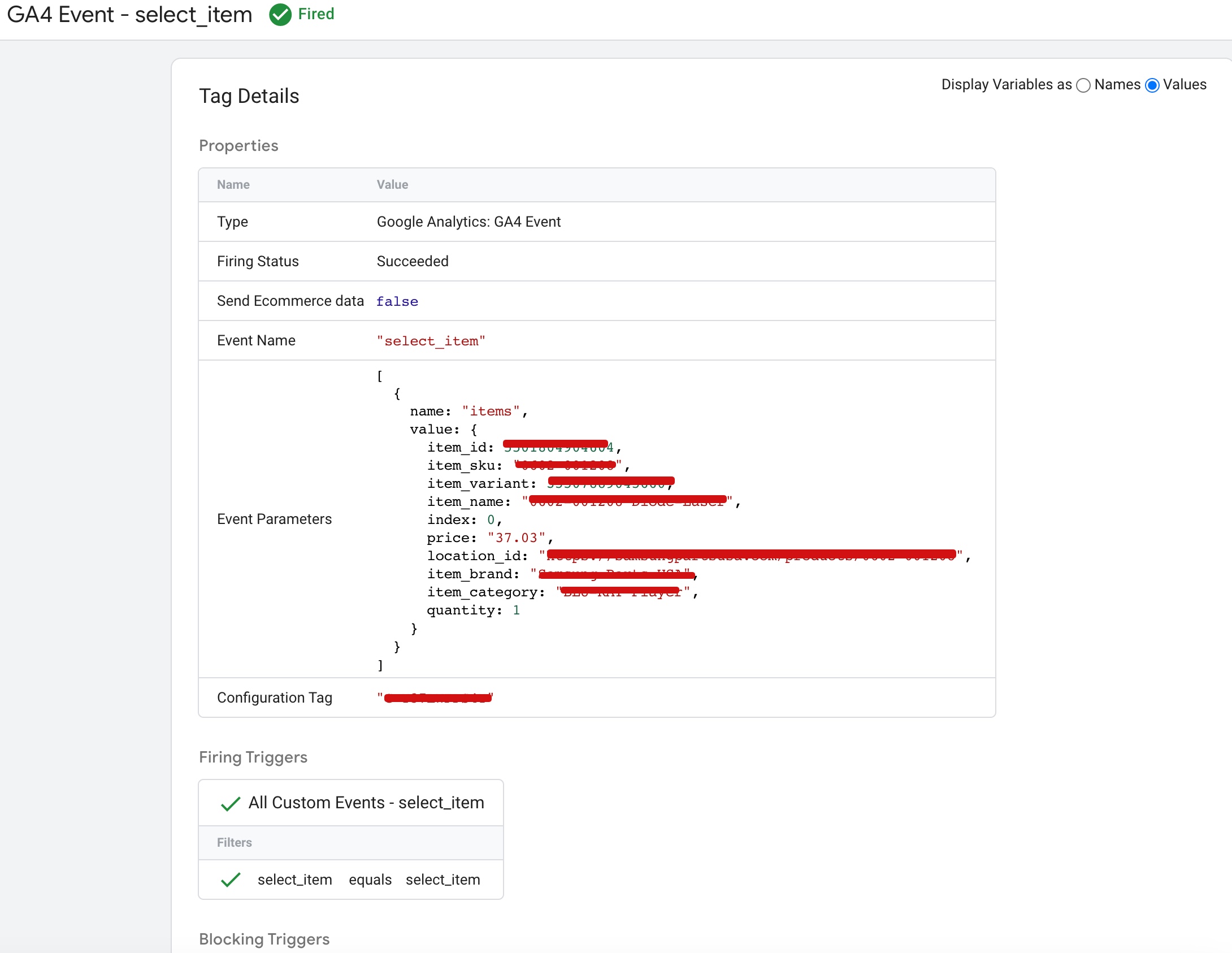
 Set Up GA4 Ecommerce Tracking on Shopify

Set up Ecommerce Google Analytics 4 (GA4) on Shopify using Google Tag Manager

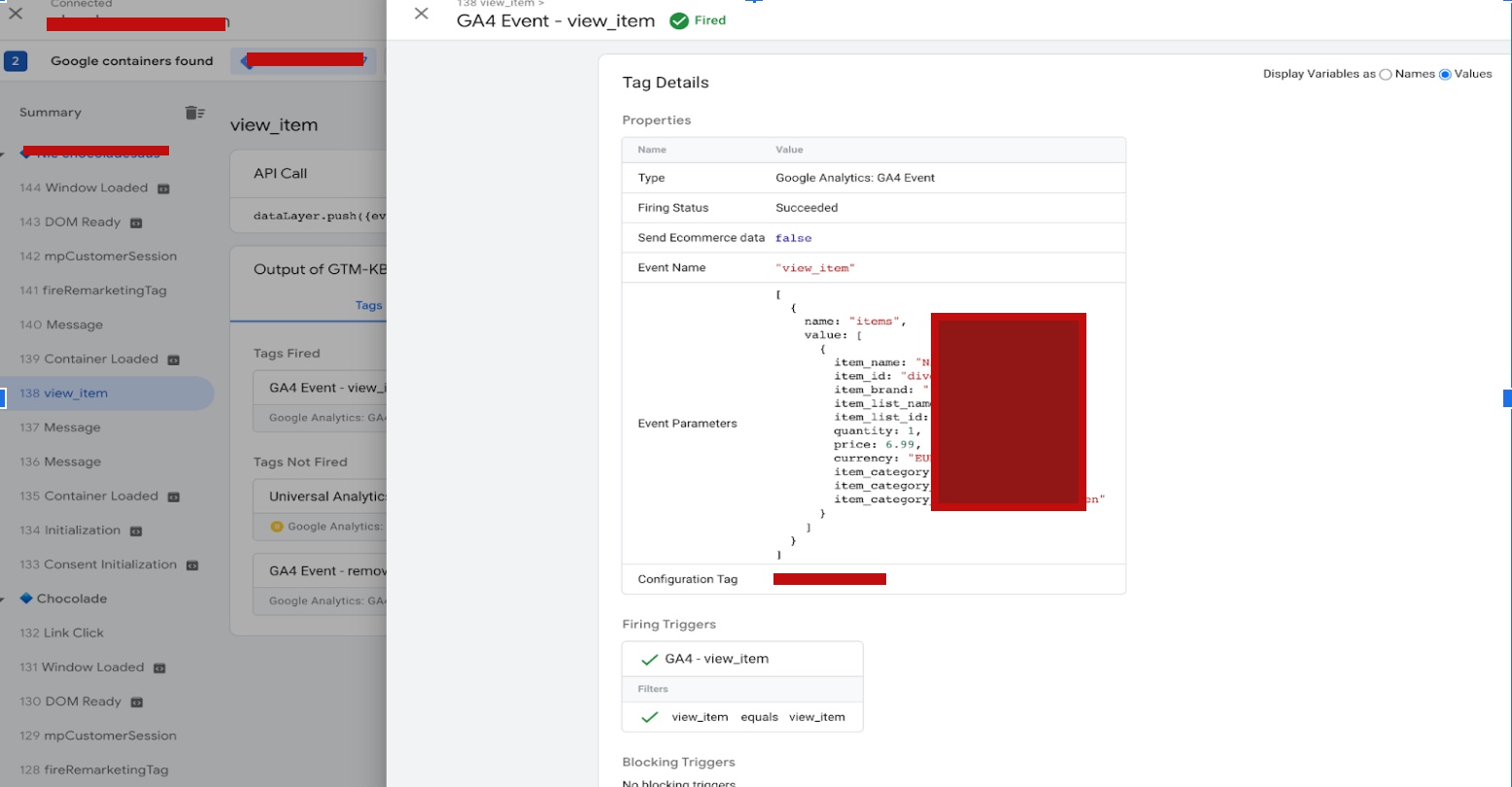
To set up GA4 eCommerce tracking on Shopify “view_item“, you will need to add the necessary code to your product pages. This code includes the event parameters for the “view_item” event, such as the event category and the product information.
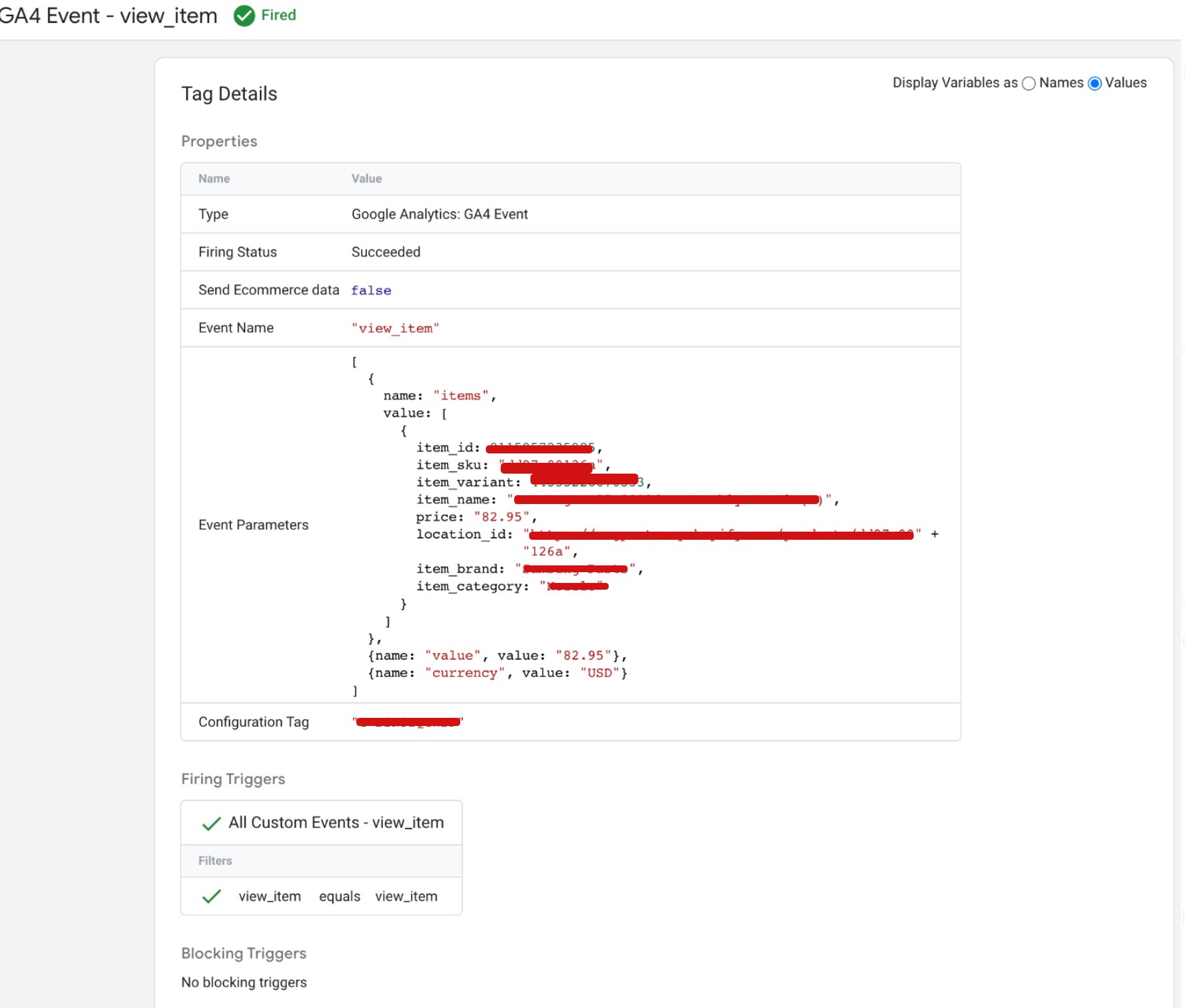
GA4 on Shopify

Set up GA4 eCommerce Enhanced Tracking for Shopify using Google Tag Manager

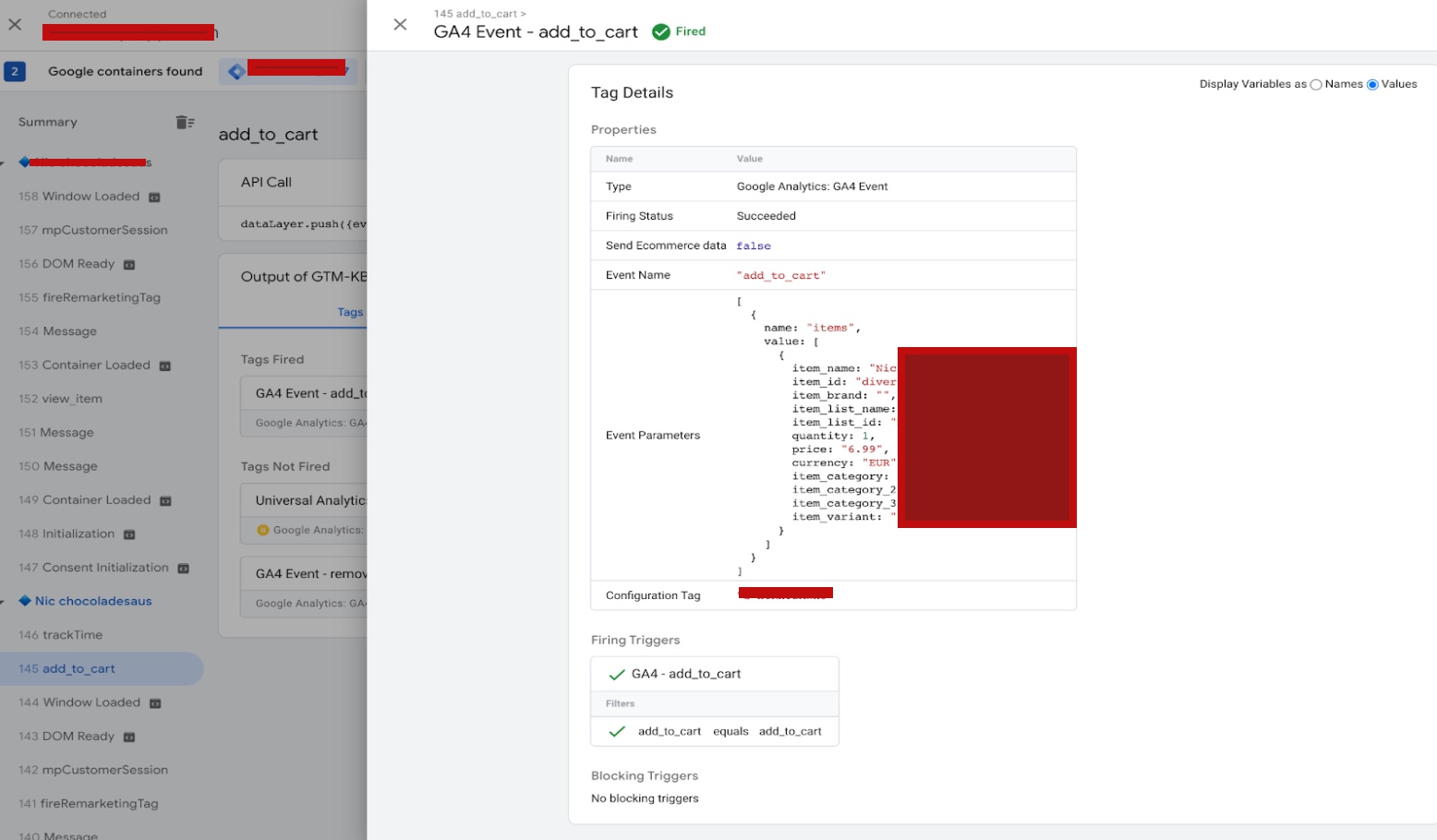
To set up GA4 eCommerce tracking on Shopify “add_to_cart“, you will need to add the necessary code to your cart page or the “add to cart” button on your product pages. This code includes the event parameters for the “add_to_cart” event, such as the event category and the product information.
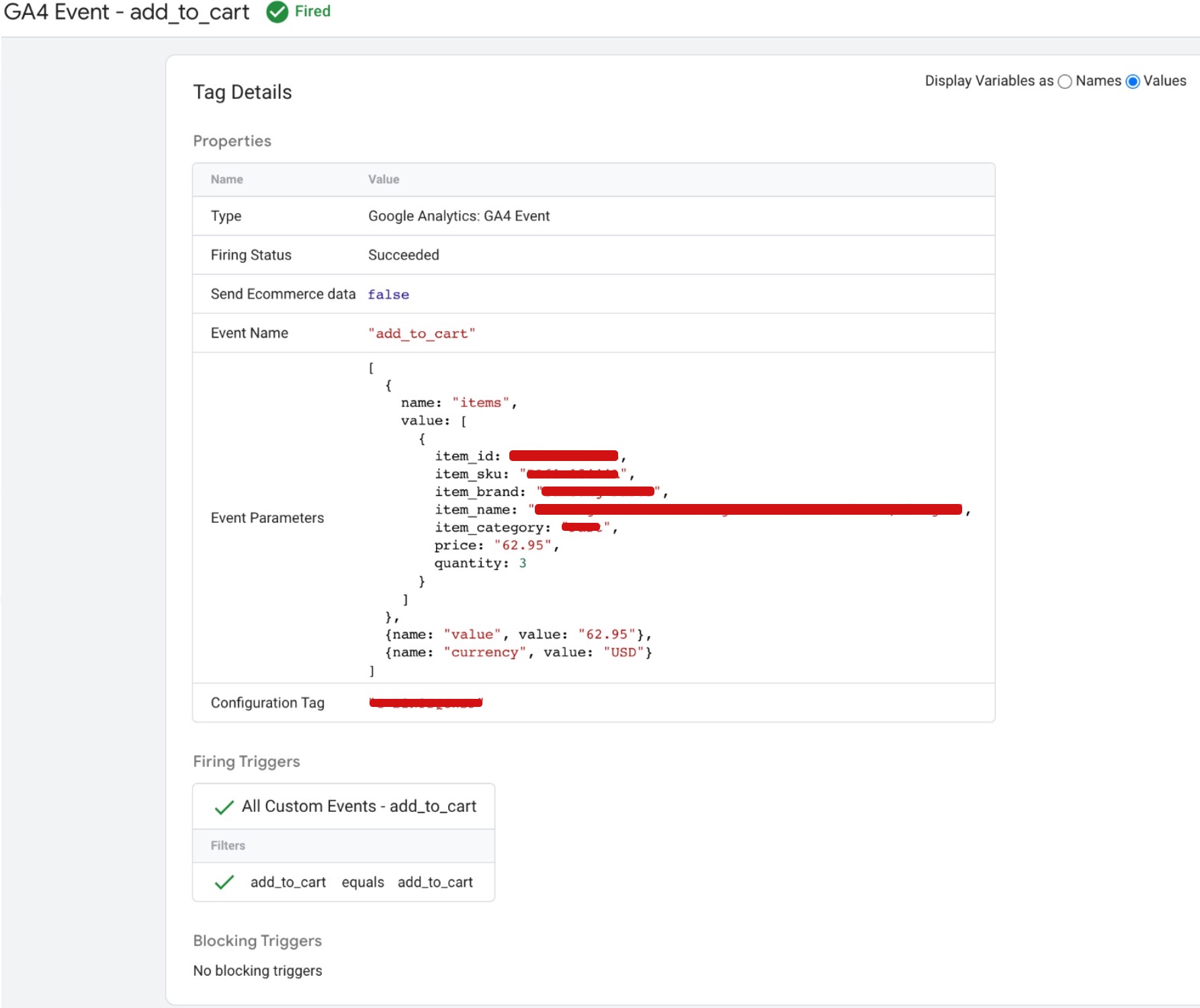
Add Google Analytics 4 to Shopify

Google Analytics 4 Setup on Shopify eCommerce Tracking using Google Tag Manager

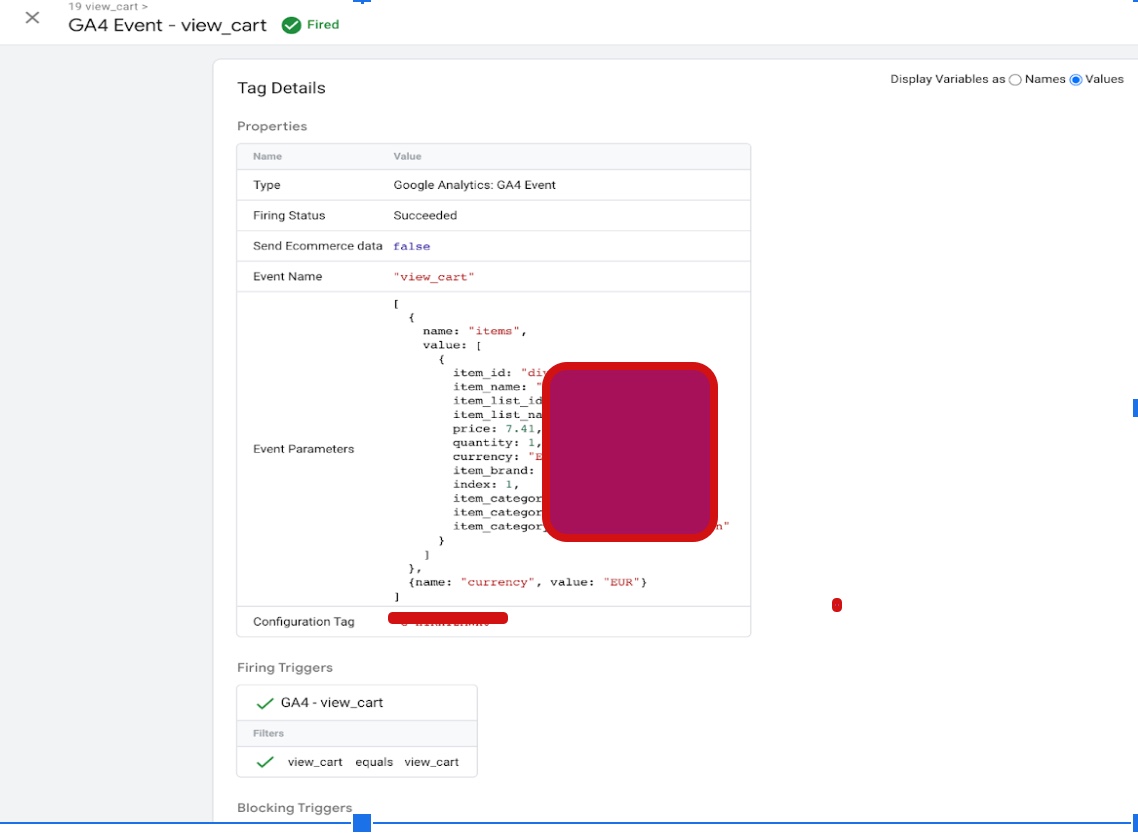
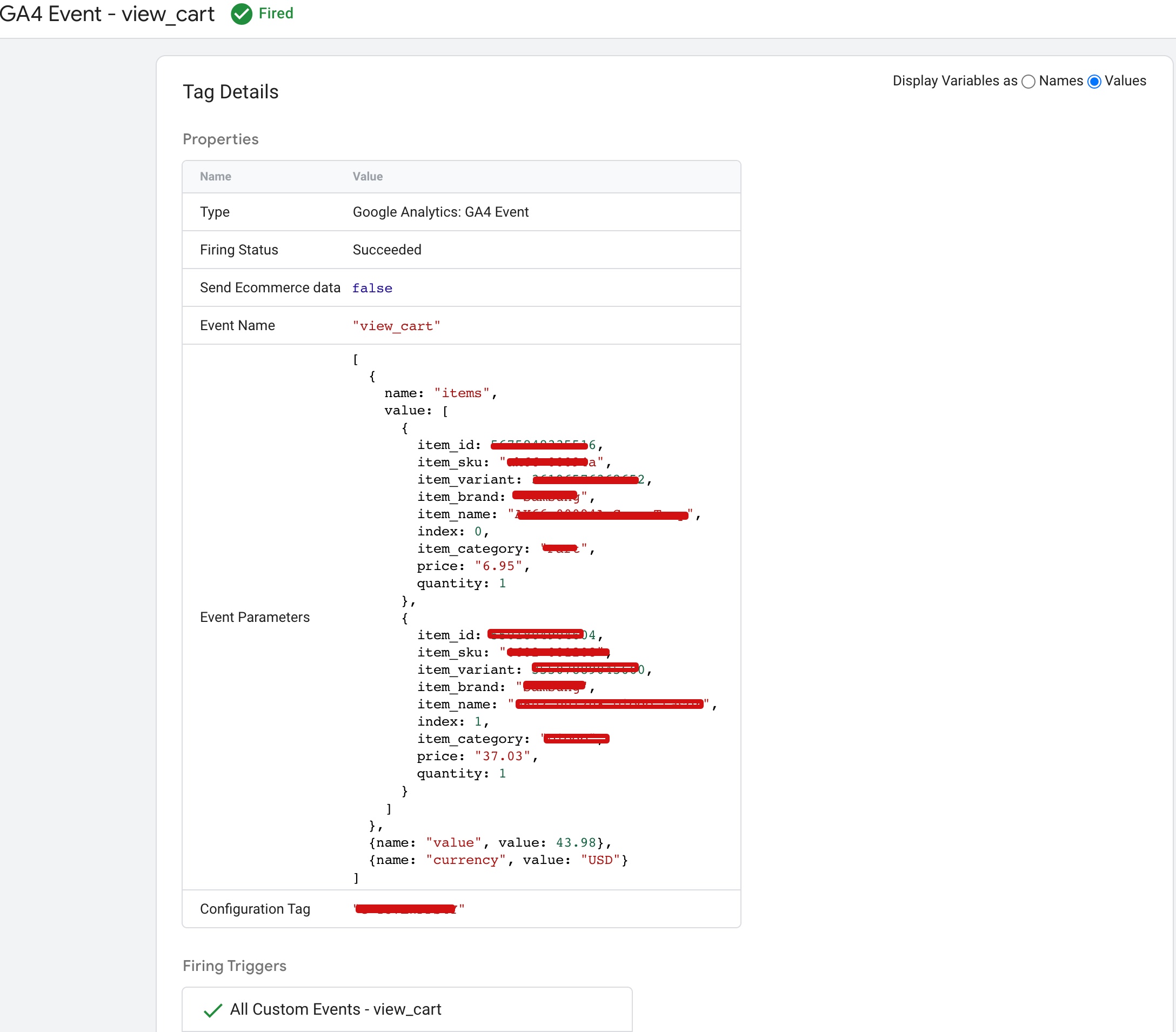
To set up GA4 eCommerce tracking on Shopify “view_cart“, you will need to add the necessary code to your cart page. This code includes the event parameters for the “view_cart” event, such as the event category and the product information.
 Google Analytics 4 implementation Shopify

set up Google Analytics 4 (GA4) on your Shopify Store using Google Tag Manager

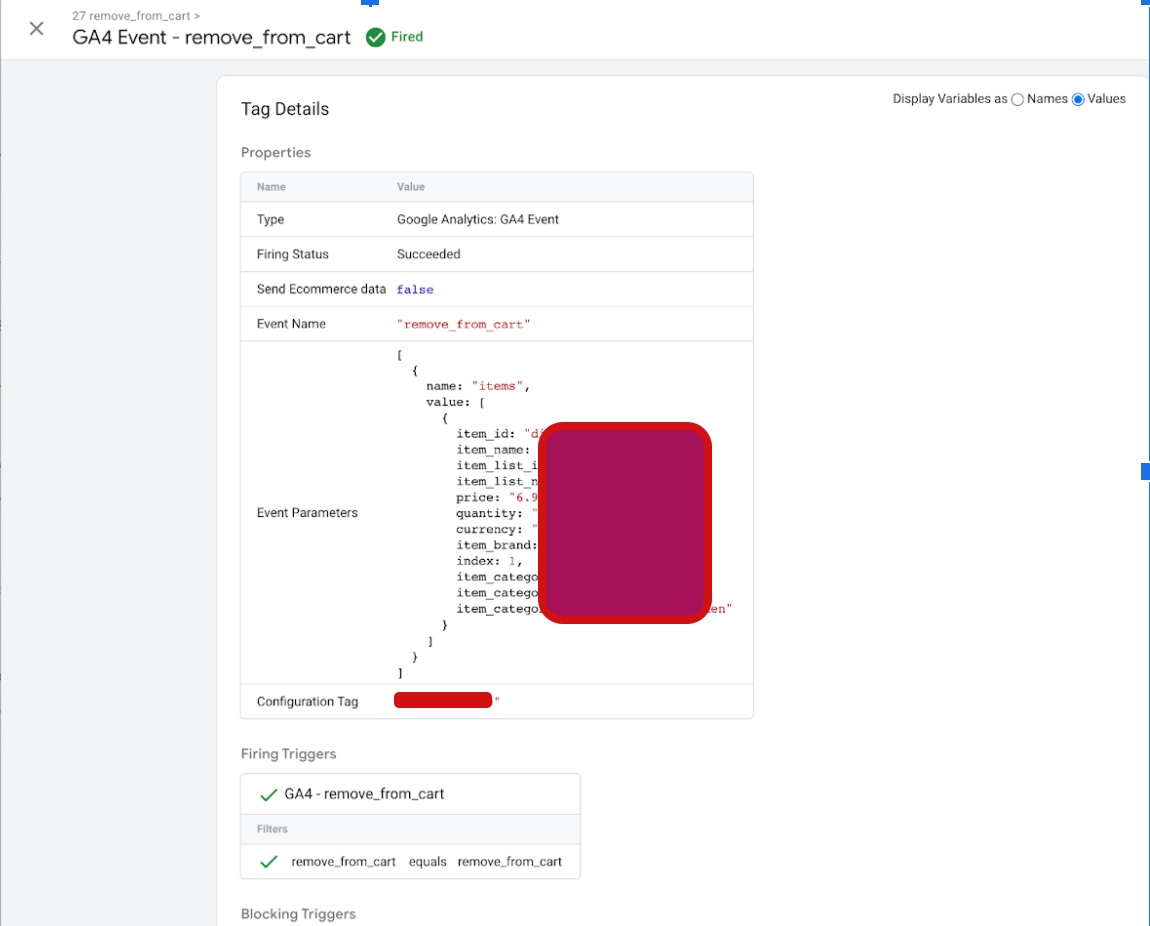
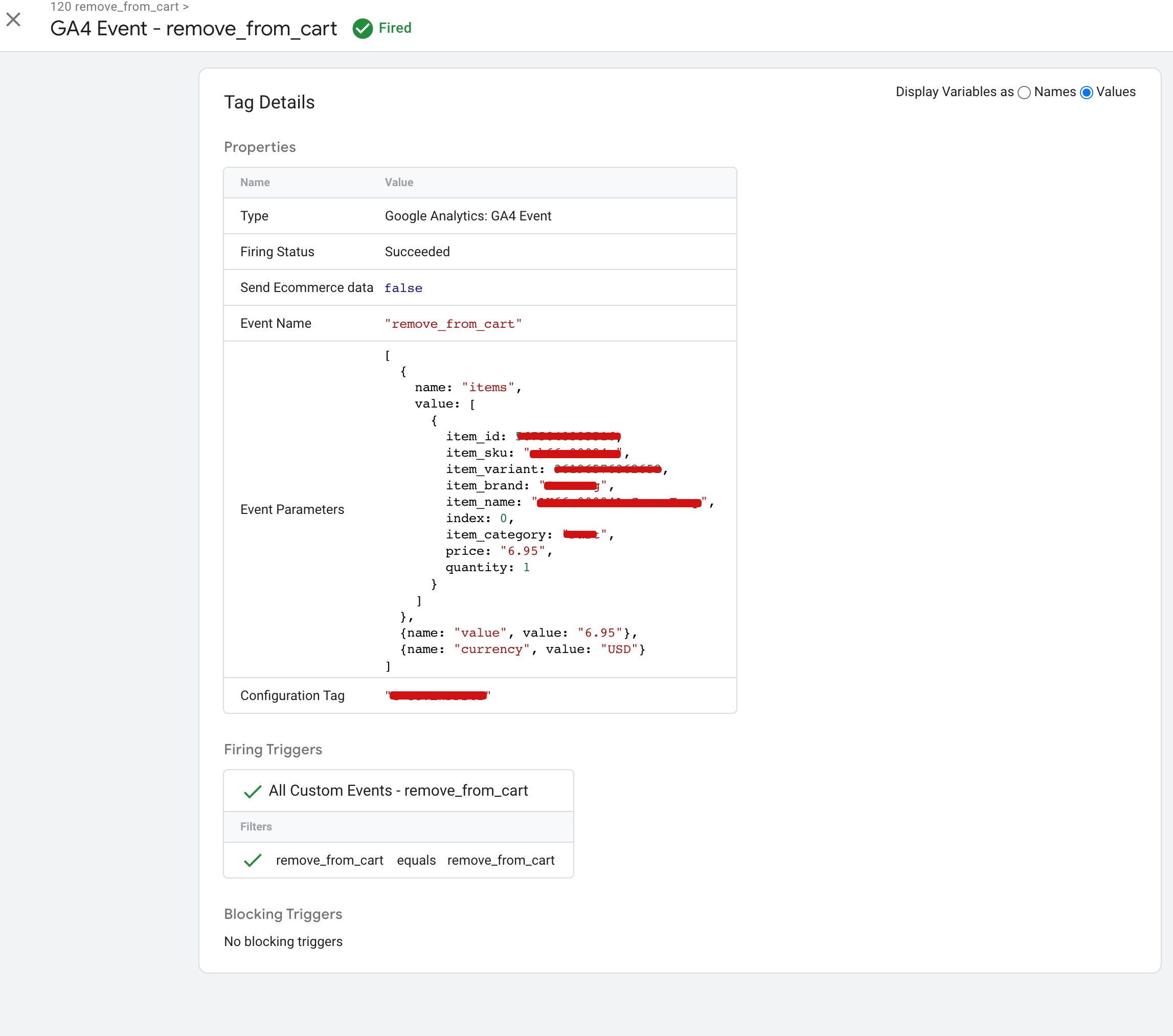
To set up GA4 eCommerce tracking on Shopify “remove_from_cart“, you will need to add the necessary code to your cart page or the “remove from cart” button on your cart page. This code includes the event parameters for the “remove_from_cart” event, such as the event category and the product information.
shopify ga4 purchase event

Shopify ga4 Integration eCommerce Tracking using Google Tag Manager

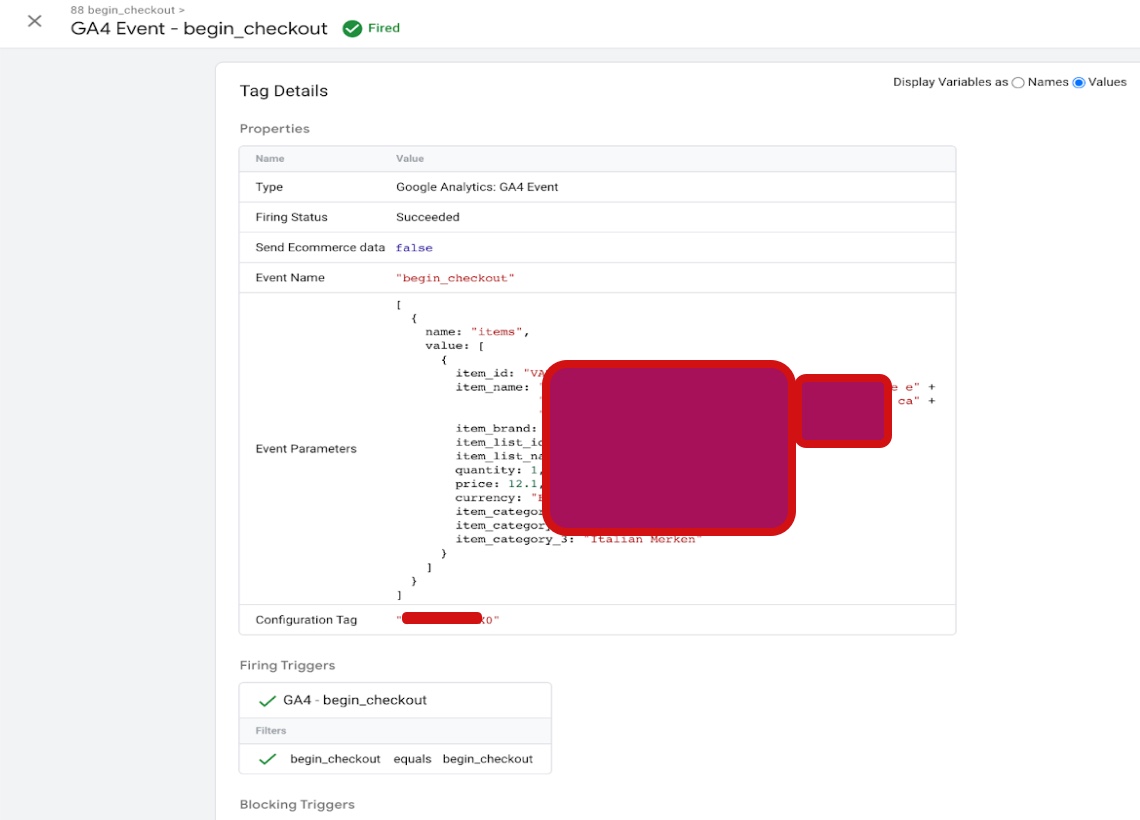
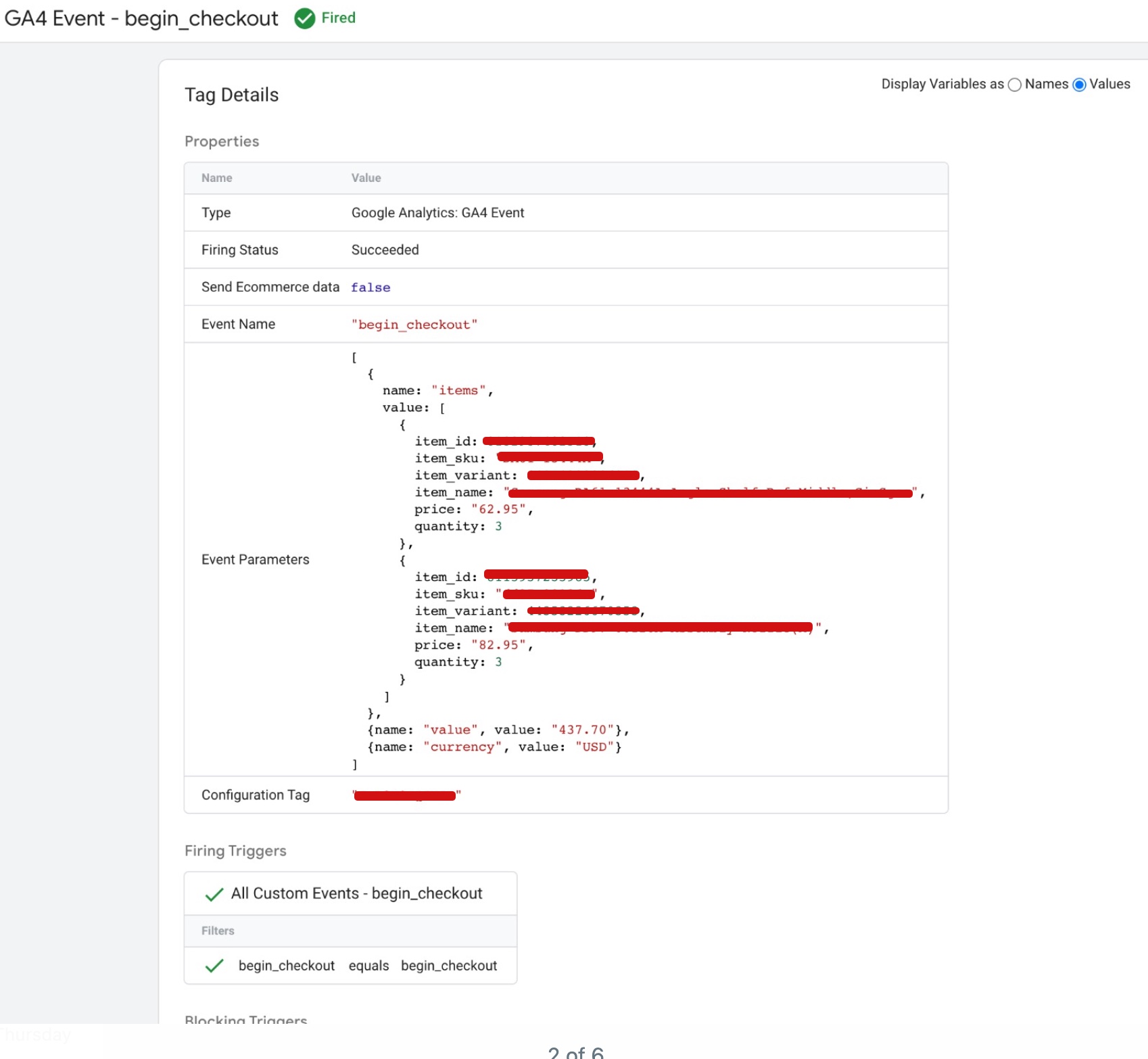
To set up GA4 eCommerce tracking on Shopify “begin_checkout“, you will need to add the necessary code to your checkout page. This code includes the event parameters for the “begin_checkout” event, such as the event category and the product information.
Set up Google Analytics 4 (GA4) on Shopify

Implement Shopify GA4 Ecommerce tracking using Google Tag Manager

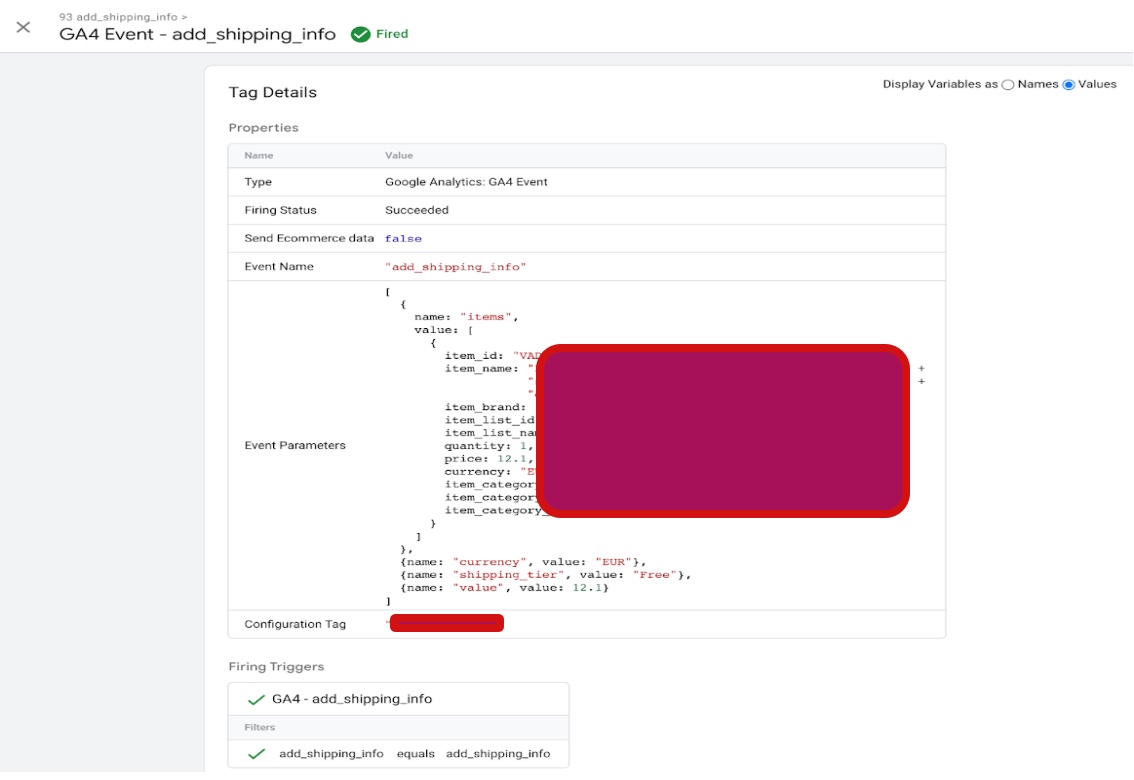
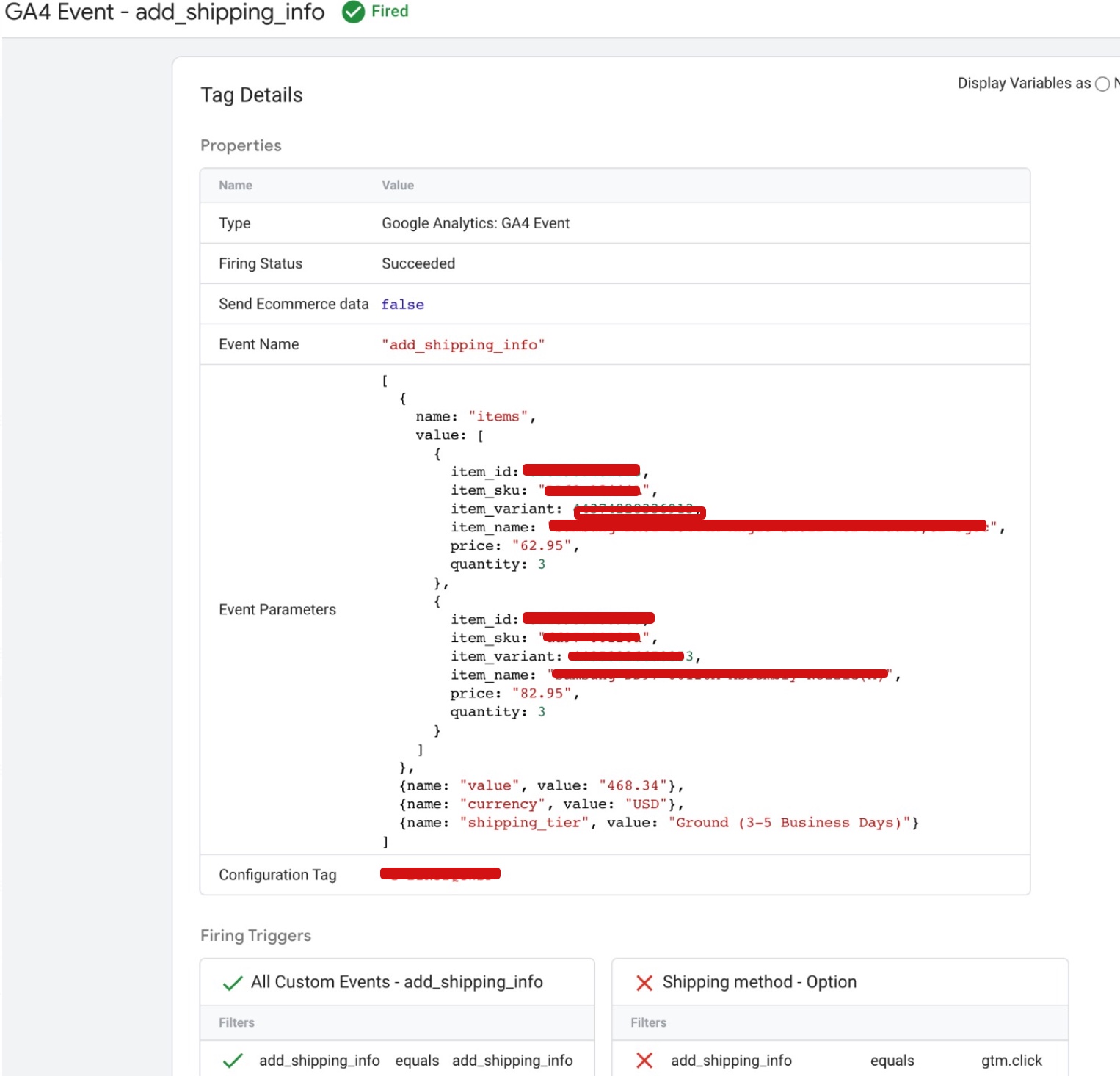
To set up GA4 eCommerce tracking on Shopify “add_shipping_info“, you will need to add the necessary code to your shipping information page or the button that the user clicks to submit their shipping information. This code includes the event parameters for the “add_shipping_info” event, such as the event category and the shipping information.
Advanced E-commerce GA4 Shopify Tracking

Shopify E-commerce GA4 Tracking Implementation using Google Tag Manager

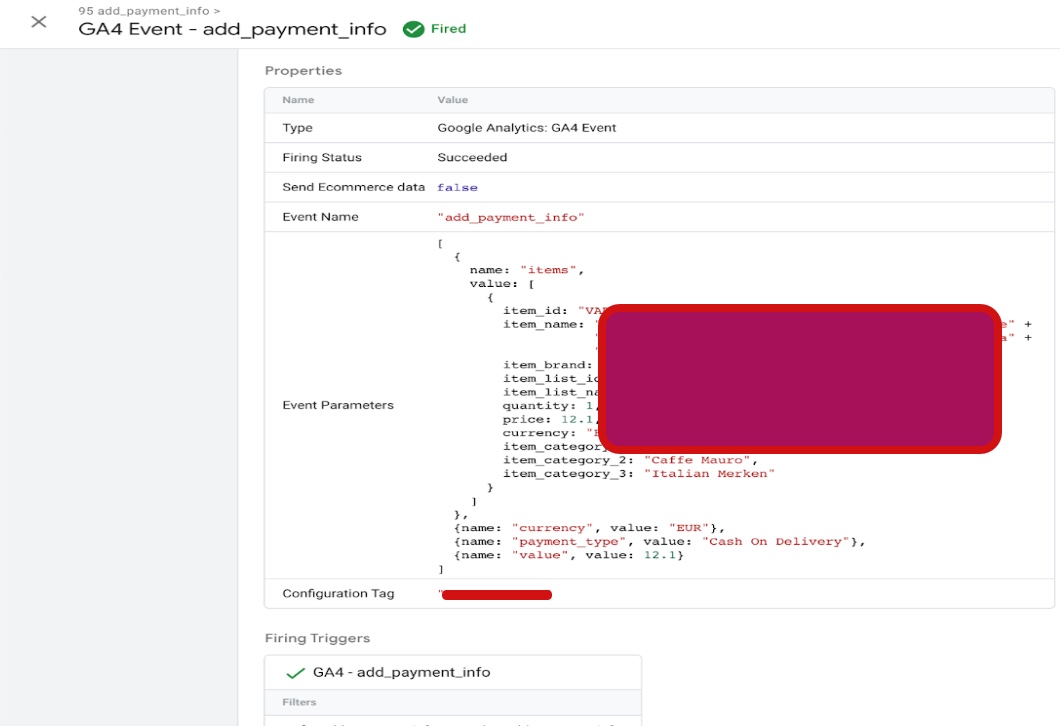
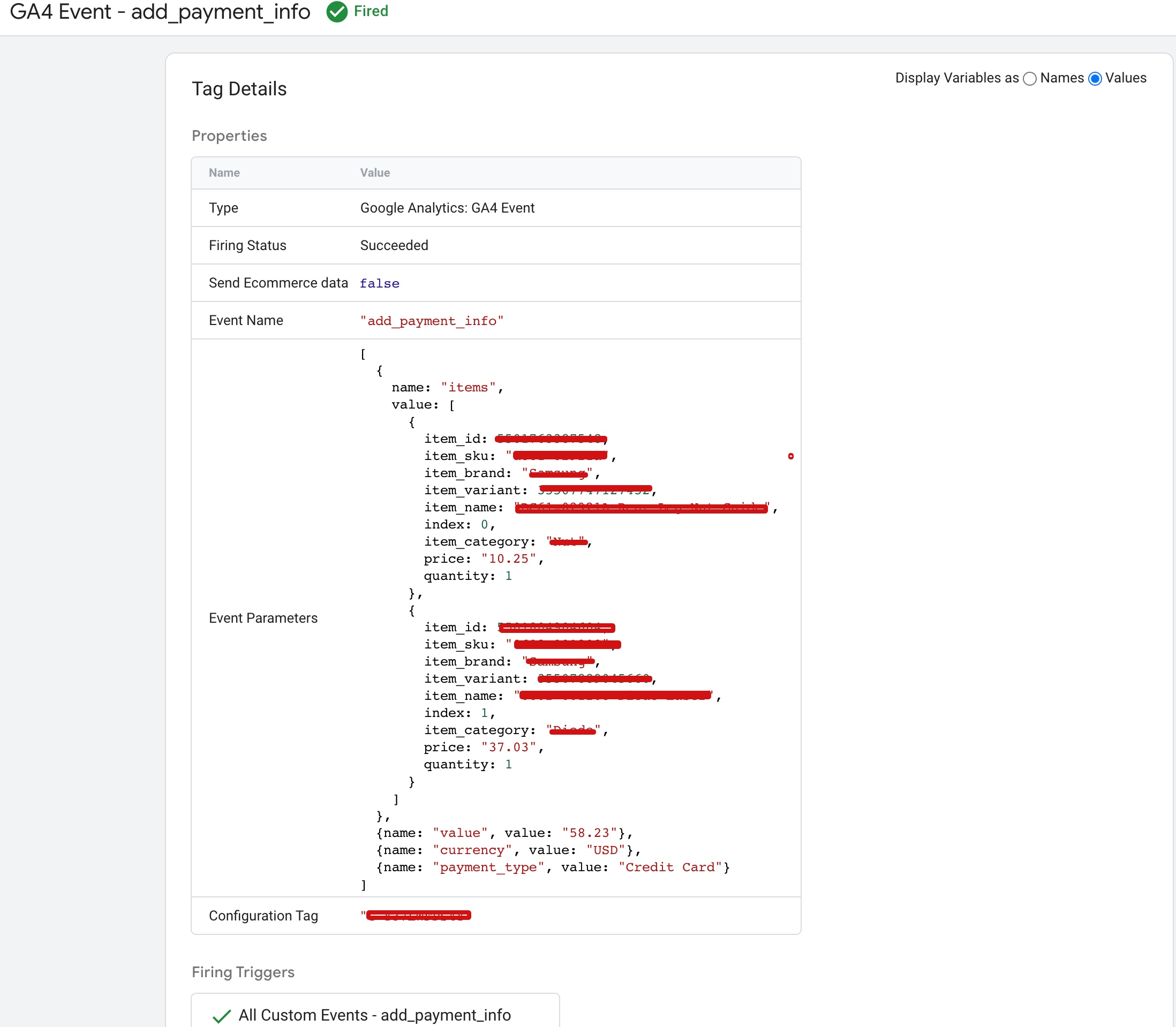
To set up GA4 eCommerce tracking on Shopify “add_payment_info“, you will need to add the necessary code to your payment information page or the button that the user clicks to submit their payment information. This code includes the event parameters for the “add_payment_info” event, such as the event category and the payment information.
Setup GA4 (Google Analytics 4) On Shopify

Google Analytics 4 (GA4) Setup in Shopify using Google Tag Manager

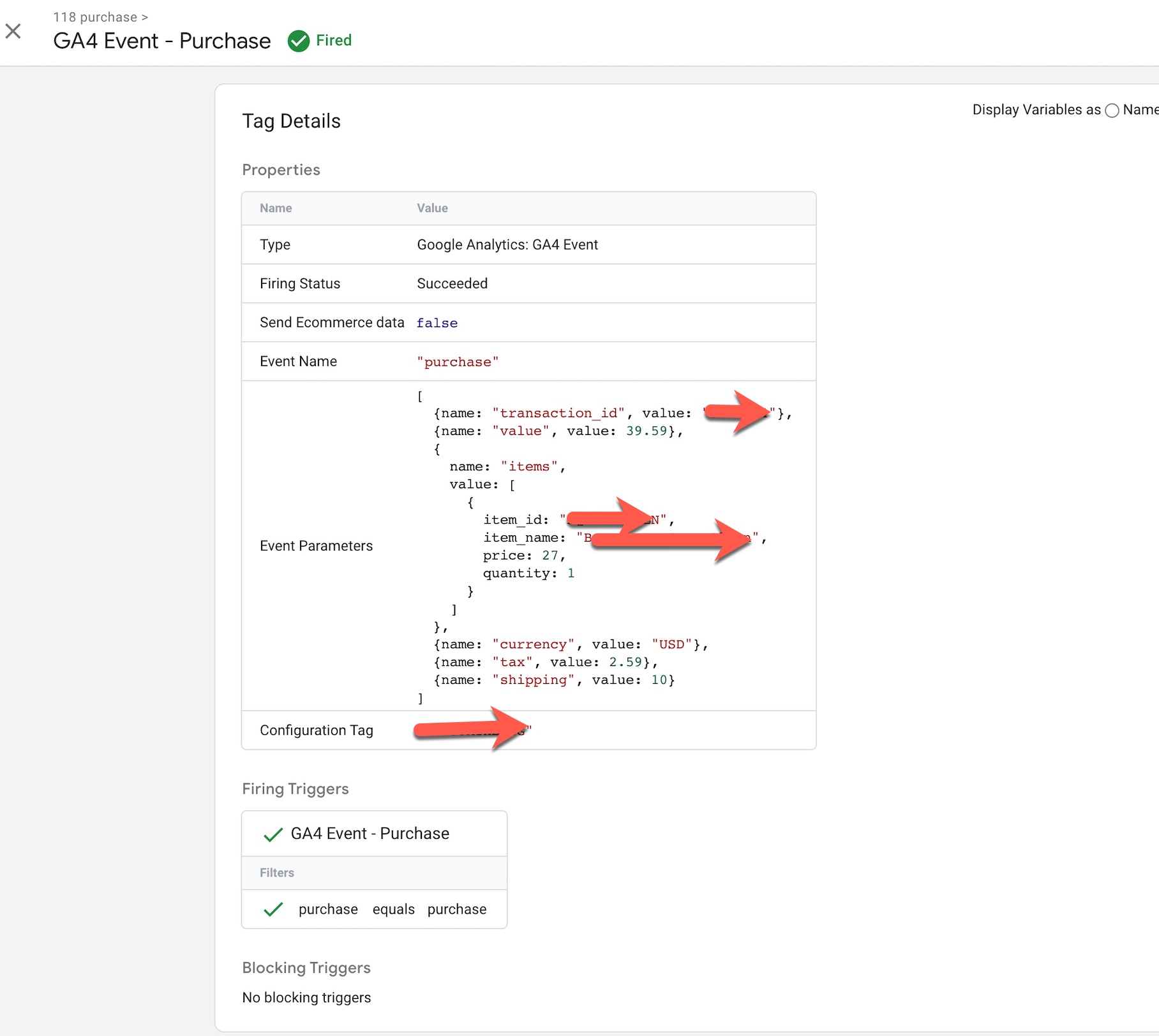
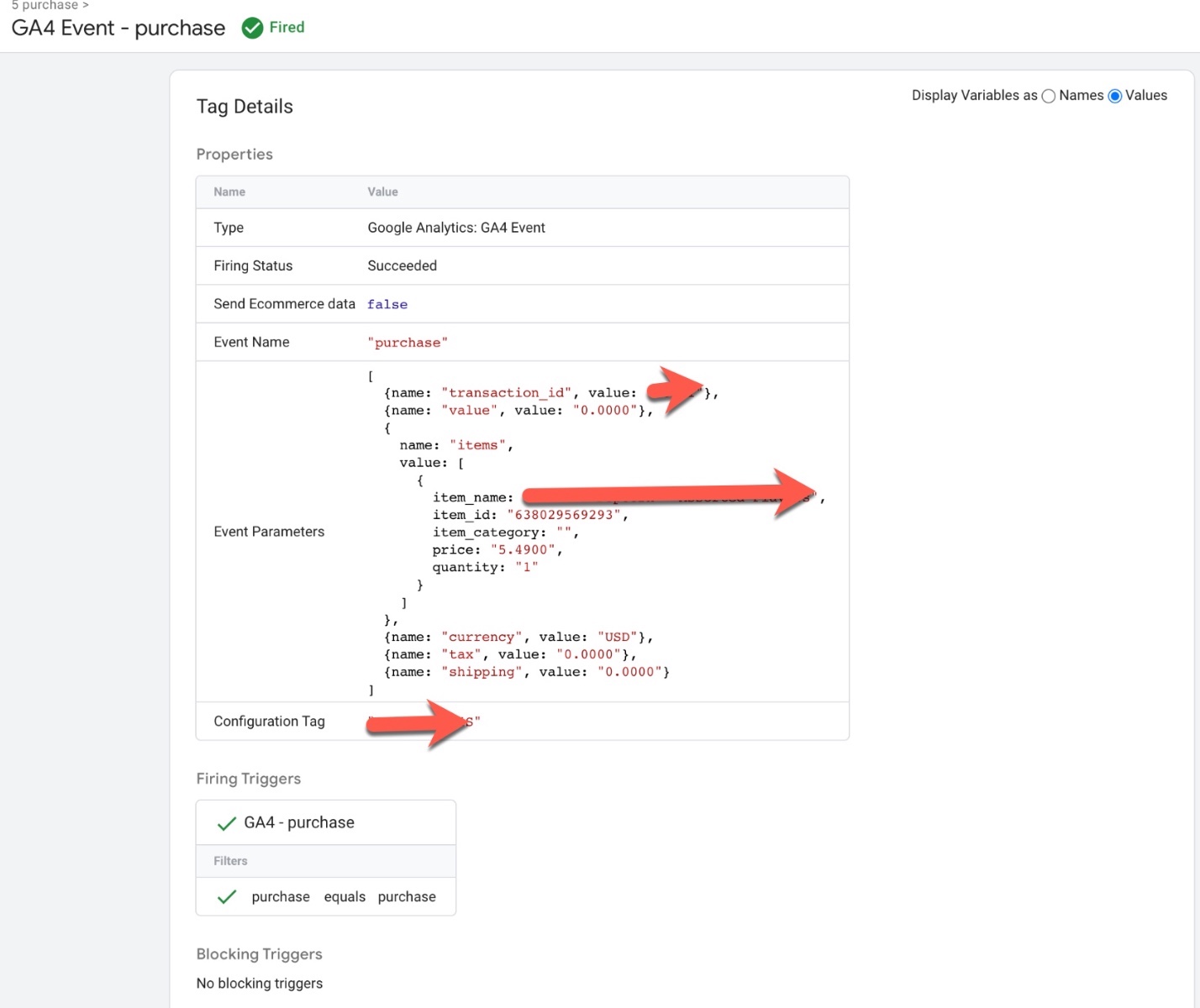
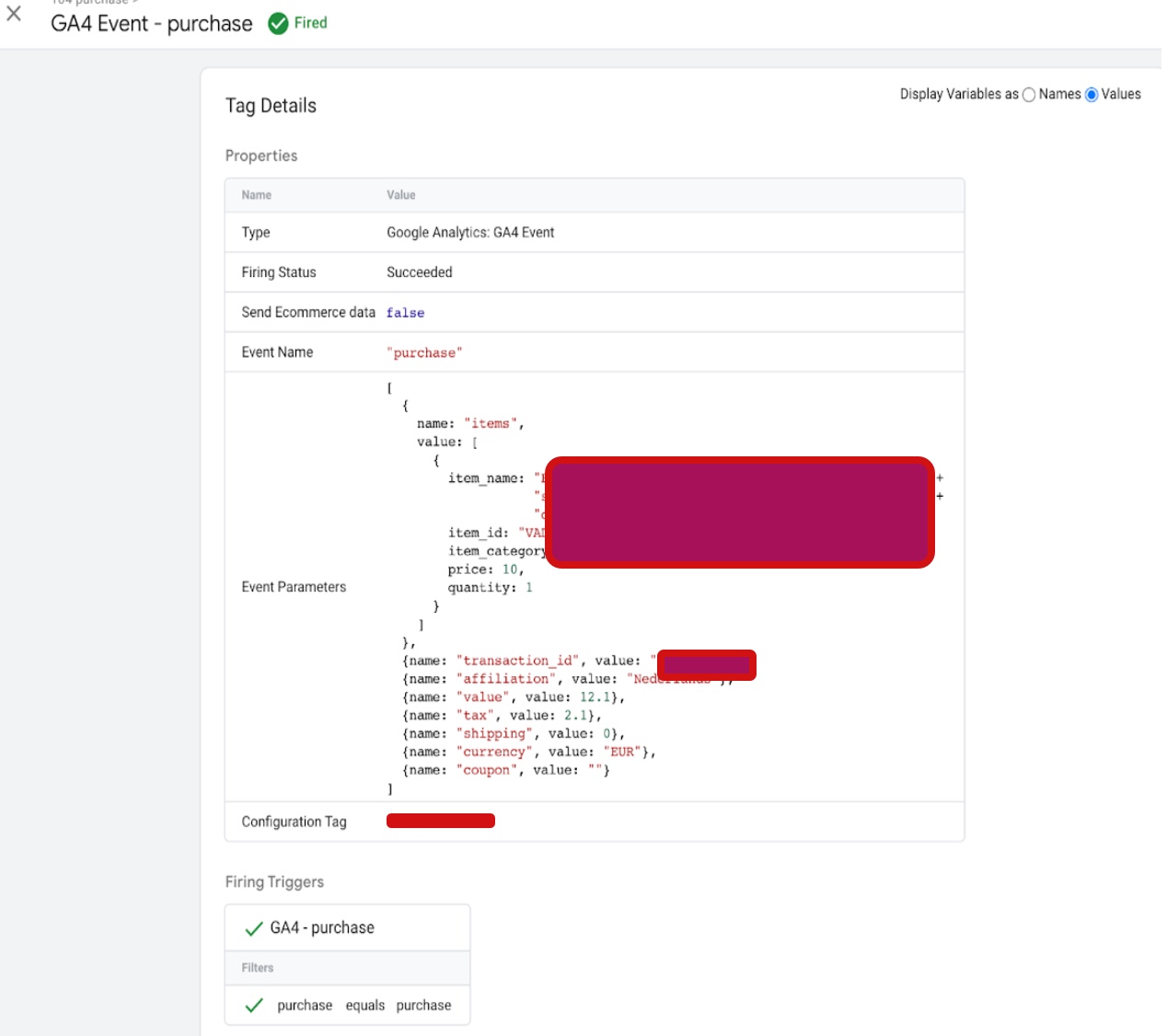
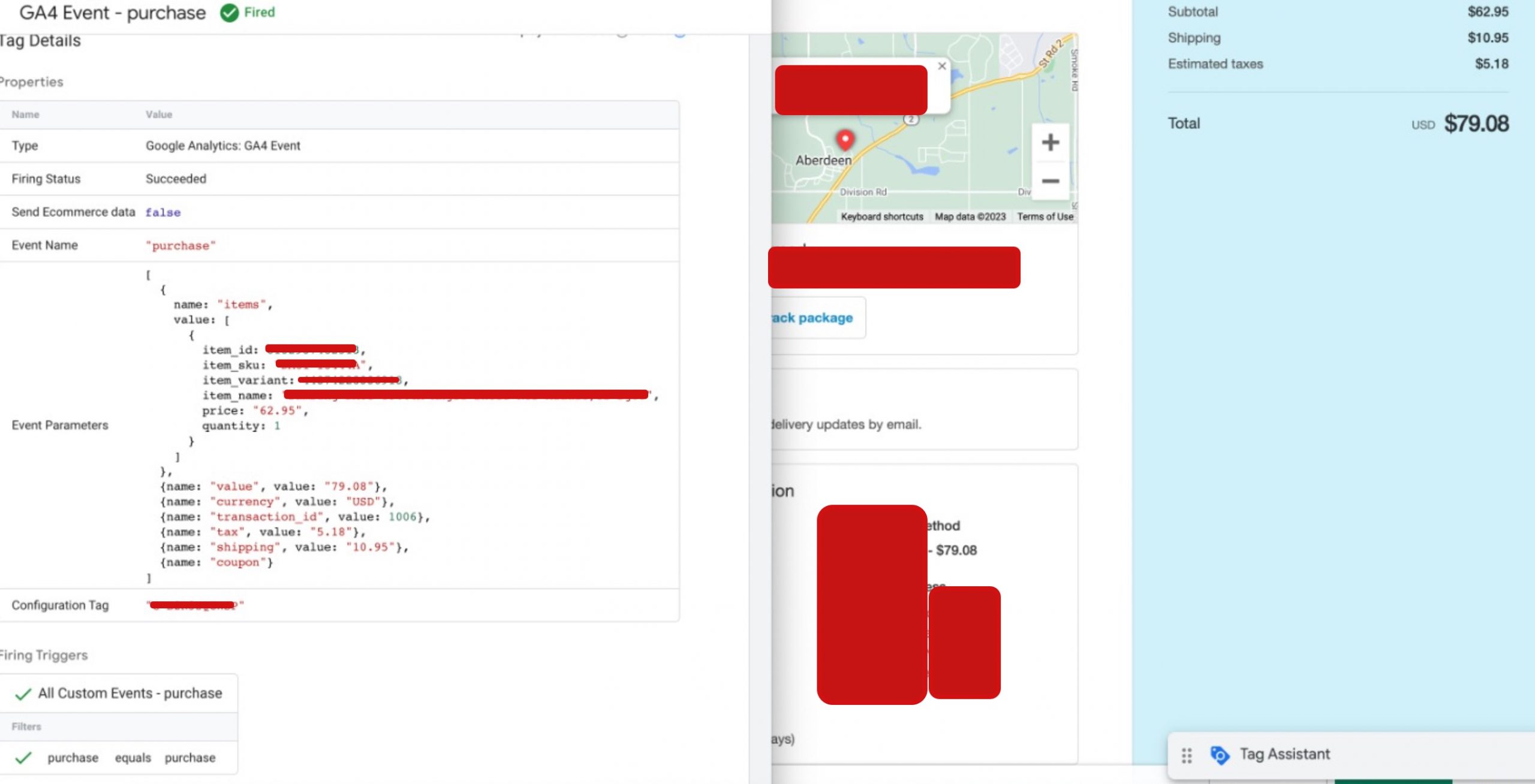
To set up GA4 eCommerce tracking on Shopify “purchase“, you will need to add the necessary code to your order confirmation page or the button that the user clicks to complete their purchase. This code includes the event parameters for the “purchase” event, such as the event category and the transaction details.
Shopify GA4 Revenue Tracking

Install GA4 On Shopify Using Purchase Customer Events using Google Tag Manager

Warning: If you don’t know about javascript or don’t have developing knowledge then don’t try to GTM  Shopify Ecommerce GA4 Purchase Value Tracking using Google Tag Manager that can break your site, Cart and other functionality 

Disclaimer: Google tag manager belongs to Google property 

For Contact: mappchero@gmail.com

I am available for Hire on Freelancer: Freelancer.com

I am available for Hire on Upwork: Upwork.com

I am available for Hire on Peopleperhour: Peopleperhour.com

I am available for Hire on Guru: Guru.com
GTM Ecommerce GA4 Purchase Value Tracking

Standard

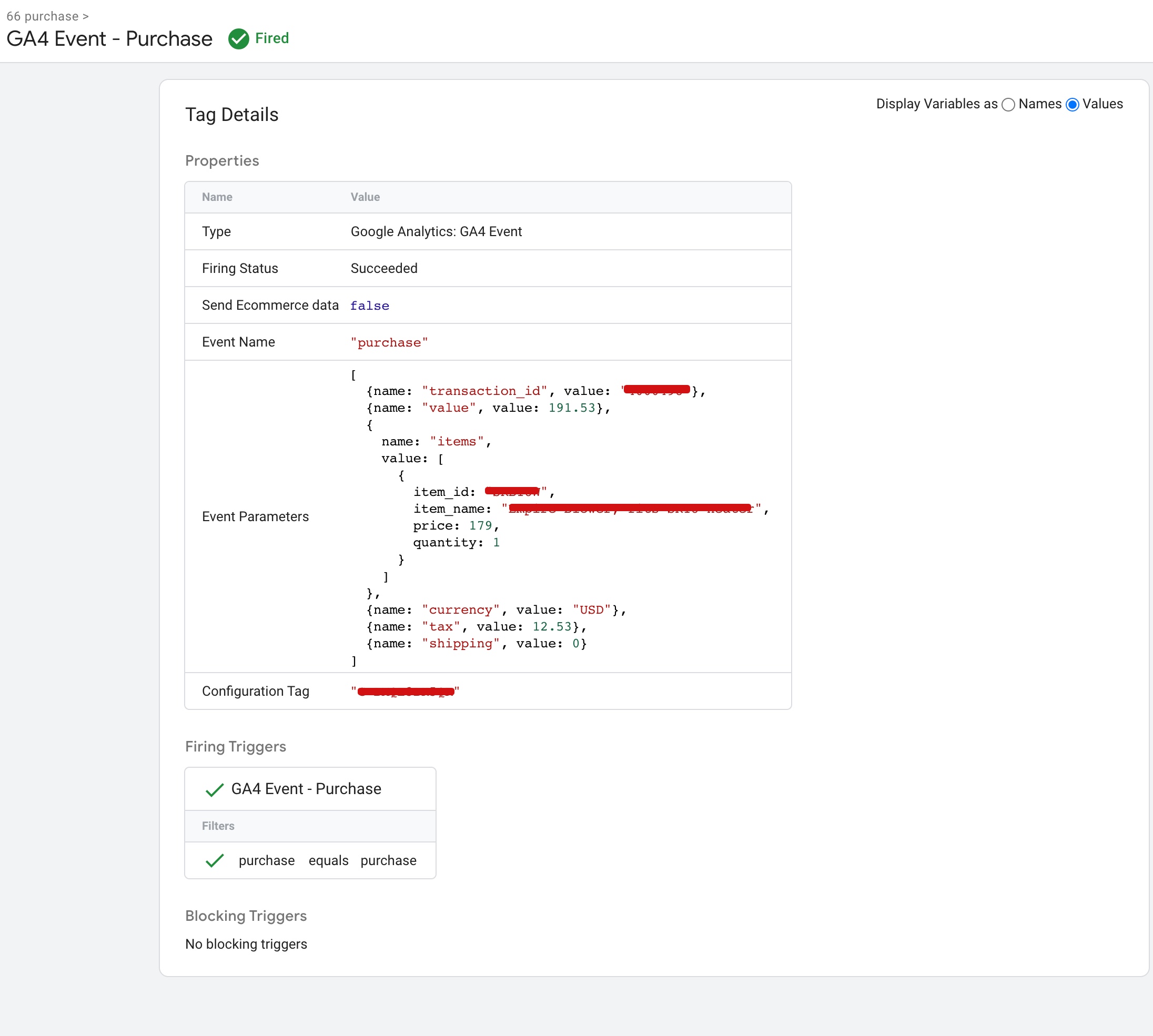
GTM Ecommerce GA4 purchase value tracking refers to the process of tracking the purchase value of ecommerce transactions in Google Analytics 4 using Google Tag Manager (GTM). Google Analytics 4 is the latest version of Google Analytics and includes new features and updates, including Enhanced Ecommerce, which allows for more advanced tracking of ecommerce data.

GTM is a tag management system that allows you to add and update tags on your website without the need for a developer. With GTM, you can set up and manage tags for various tracking tools, including Google Analytics, and send data to those tools through triggers.

To track purchase value in Google Analytics 4 using GTM, you would need to set up Enhanced Ecommerce for your website and send purchase data as an event with the purchase value included. GTM makes this process easier by allowing you to set up the tags and triggers necessary to send the data to Google Analytics 4 without needing to modify your website’s code.

Tracking purchase value in Google Analytics 4 using GTM Ecommerce has several benefits:

Understand revenue: Tracking purchase value allows you to see the revenue generated by your ecommerce transactions. This data is crucial for understanding the financial performance of your online business.

Analyze user behavior: By tracking purchase value, you can analyze user behavior and see which products are the most profitable, which channels are driving the most revenue, and which customer segments are most valuable.

Improve marketing campaigns: With purchase value data, you can optimize your marketing campaigns and allocate your budget more effectively. For example, you can identify which channels and campaigns are driving the highest revenue and focus your efforts on those channels.

Monitor trends: By tracking purchase value over time, you can monitor trends and see how your ecommerce revenue is growing or declining. This can help you make informed decisions about pricing, inventory management, and other business strategies.

Setting up GTM Ecommerce GA4 purchase value tracking is important for several reasons:

Accurate revenue tracking: Without purchase value tracking, it can be difficult to accurately track the revenue generated by your ecommerce transactions. By setting up purchase value tracking in Google Analytics 4 using GTM, you can ensure that your revenue data is accurate and up-to-date.

Data-driven decision-making: Purchase value data is crucial for making data-driven decisions about your ecommerce business. With this data, you can identify which products and channels are driving the most revenue, which customer segments are the most valuable, and which marketing campaigns are the most effective.

Optimization of marketing campaigns: By tracking purchase value, you can optimize your marketing campaigns to focus on the channels and campaigns that are driving the highest revenue. This can help you allocate your marketing budget more effectively and generate a higher return on investment.

Monitoring of ecommerce trends: By tracking purchase value over time, you can monitor trends in your ecommerce revenue and identify areas for improvement. For example, if you see a decline in revenue from a particular product or channel, you can investigate the cause and take action to address the issue.

Ecommerce Tracking Setup in GA4

GA4 Ecommerce Purchase Event Setup using Google Tag Manager

Warning: If you don’t know about javascript or don’t have developing knowledge then don’t try to GTM Ecommerce GA4 Purchase Value Tracking using Google Tag Manager that can break your site, Cart and other functionality 

Disclaimer: Google tag manager belongs to Google property 

For Contact: mappchero@gmail.com

I am available for Hire on Freelancer: Freelancer.com

I am available for Hire on Upwork: Upwork.com

I am available for Hire on Peopleperhour: Peopleperhour.com

I am available for Hire on Guru: Guru.com
Revenue Tracking with GA4 eCommerce Tracking

Standard

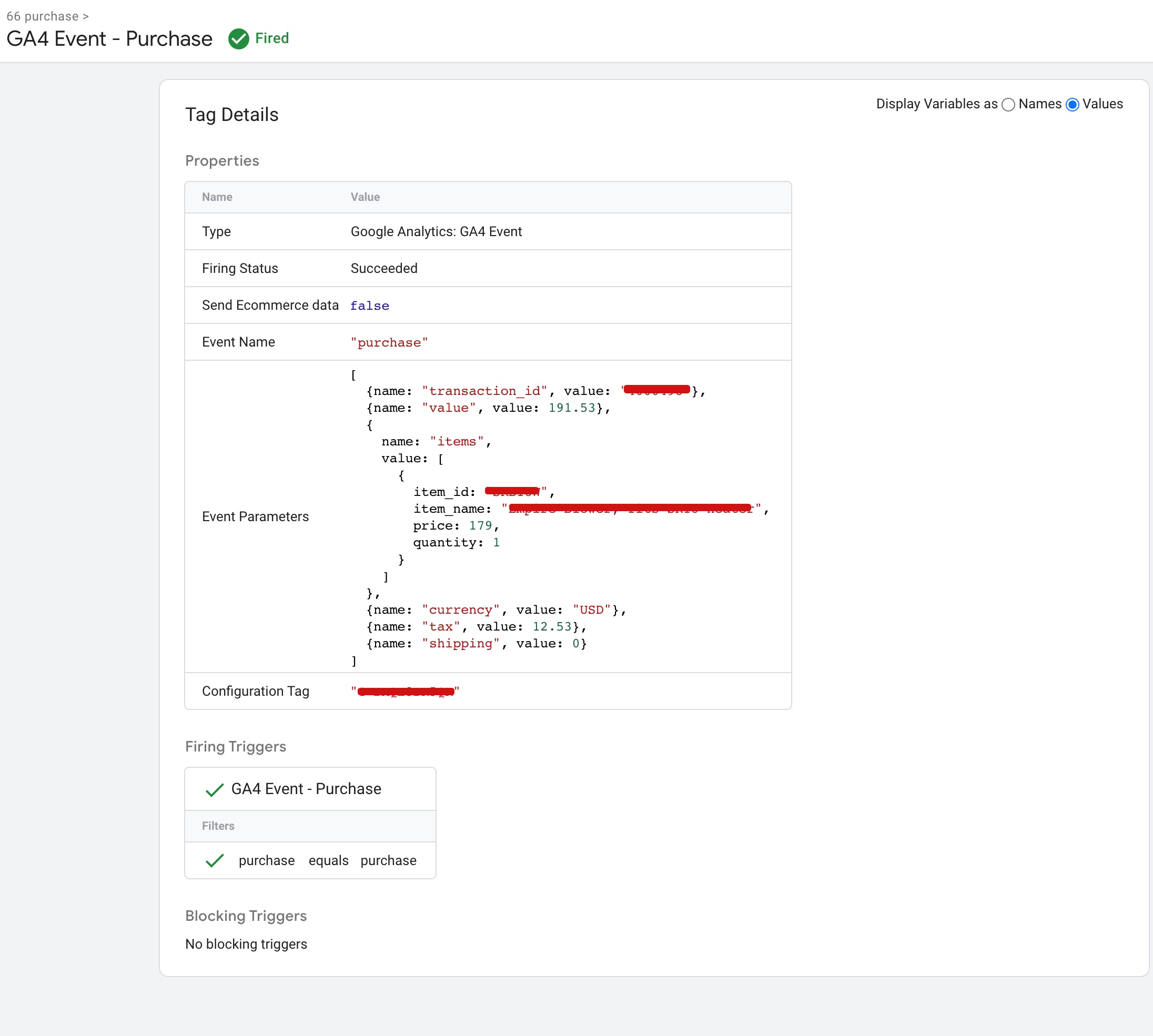
GA4 (Google Analytics 4) eCommerce Tracking is a feature that enables website owners to track and analyze user behavior related to online shopping. GA4 eCommerce Tracking provides businesses with insights into their customers’ purchase behavior, allowing them to optimize their sales strategy and improve their bottom line.

Here’s how GA4 eCommerce Tracking works:

Enable eCommerce Tracking: First, you need to enable eCommerce tracking in your GA4 property. This can be done by going to your property’s Admin settings and turning on eCommerce tracking.

Implement Enhanced Measurement: To capture eCommerce data, you need to implement Enhanced Measurement. This is a feature that automatically tracks user interactions on your website, such as clicks on product links, add-to-cart buttons, and purchase events.

Set up Conversion Tracking: Next, you’ll need to set up conversion tracking by defining your conversion goals. For example, you may want to track purchases, sign-ups, or other actions that are important to your business.

Analyze Your Data: Once you have eCommerce tracking set up, you can start analyzing your data. You can view reports on the products users are buying, the revenue generated, and other key metrics. This information can help you make data-driven decisions about your eCommerce strategy.

GA4 (Google Analytics 4) eCommerce Tracking offers a number of benefits to businesses that use it to track and analyze their customers’ online shopping behavior.

Here are some of the key benefits:

Improved Tracking Accuracy: GA4 eCommerce Tracking uses advanced measurement techniques to capture more accurate data on user interactions with your eCommerce website. This means that you’ll get a more complete picture of your customers’ behavior, and be better able to identify areas for improvement in your online shopping experience.

Deeper Insights: With GA4 eCommerce Tracking, you can track user behavior across multiple devices and platforms, giving you a more comprehensive view of your customers’ journey from browsing to purchase. This deeper insight can help you understand which marketing channels are driving the most sales, which products are most popular, and how you can optimize your eCommerce strategy to improve conversions.

Enhanced Personalization: By analyzing user behavior, you can create more personalized shopping experiences for your customers. For example, you can use data on which products users have viewed or added to their cart to recommend related items, or offer targeted promotions to customers who have abandoned their carts.

Better ROI: By understanding which marketing channels and campaigns are driving the most sales, you can optimize your advertising spend and improve your return on investment (ROI). This can help you allocate your resources more effectively, and focus on the strategies that are most likely to generate revenue.

Cross-Platform Insights: With GA4 eCommerce Tracking, you can track user behavior across multiple platforms, including your website, mobile app, and social media channels. This gives you a more comprehensive view of your customers’ behavior, and helps you understand how different platforms are contributing to your overall sales.

GA4 eCommerce Purchase Event

GA4 eCommerce Tracking, Reporting using Google Tag Manager

Warning: If you don’t know about javascript or don’t have developing knowledge then don’t try to Revenue Tracking with GA4 eCommerce Tracking using Google Tag Manager that can break your site, Cart and other functionality 

Disclaimer: Google tag manager belongs to Google property 

For Contact: mappchero@gmail.com

I am available for Hire on Freelancer: Freelancer.com

I am available for Hire on Upwork: Upwork.com

I am available for Hire on Peopleperhour: Peopleperhour.com

I am available for Hire on Guru: Guru.com
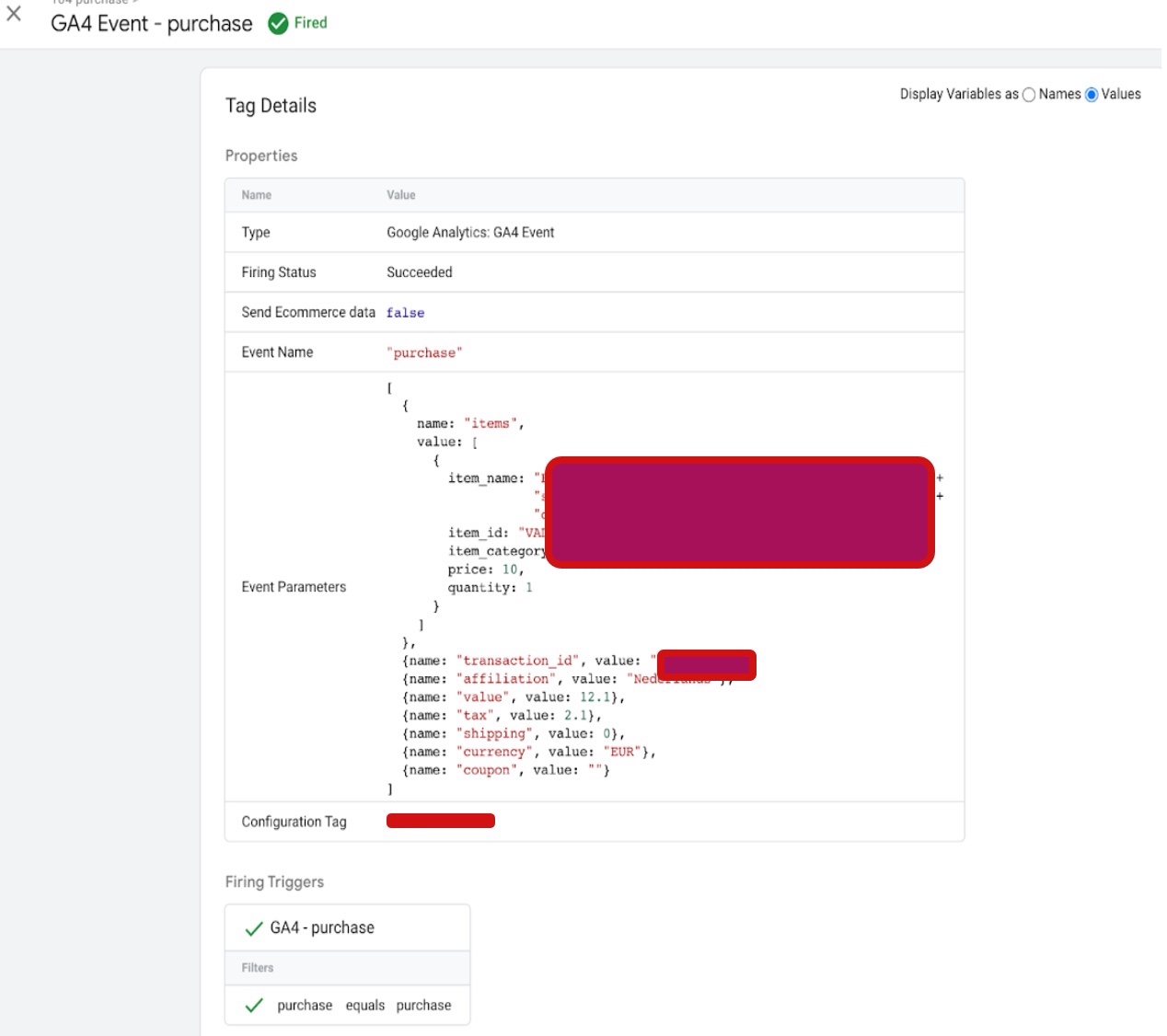
GA4 eCommerce Tracking Set Up via Google Tag Manager

Standard

GA4 eCommerce tracking set up is the process of configuring your GA4 property to track and analyze eCommerce transactions on your website. With eCommerce tracking set up, you can gain valuable insights into your customers’ behavior, track the performance of your products, and optimize your online store for improved sales and conversions.

The set up process typically involves adding the global site tag (gtag.js) to your website, enabling enhanced eCommerce tracking in your GA4 property, implementing product data, and adding the purchase event to your website’s checkout page. You may also need to set up conversion tracking to track specific actions on your website.

Once your eCommerce tracking is set up, you can monitor your data in GA4 to gain insights into your customers’ behavior, such as what products they’re buying, how much they’re spending, and where they’re dropping off in the purchase funnel. This information can help you make data-driven decisions to improve your online store and boost sales.

There are several benefits to setting up GA4 eCommerce tracking, including:

Better understanding of customer behavior: eCommerce tracking allows you to gain insights into how customers interact with your online store, including what products they’re buying, how much they’re spending, and where they’re dropping off in the purchase funnel.

Improved product performance: With eCommerce tracking set up, you can track the performance of individual products, including how many times they’ve been viewed, how many times they’ve been added to carts, and how many times they’ve been purchased.

Optimization of your online store: Armed with insights into customer behavior and product performance, you can make data-driven decisions to optimize your online store for improved sales and conversions. For example, you may choose to adjust product pricing, redesign your checkout process, or promote certain products to increase sales.

Tracking of conversion rates: eCommerce tracking allows you to track conversion rates for specific actions on your website, such as adding a product to a cart, initiating checkout, or completing a purchase. This information can help you identify areas for improvement and optimize your online store accordingly.

Enhanced reporting: GA4 offers more robust reporting capabilities than previous versions of Google Analytics, allowing you to create custom reports, visualize data in new ways, and gain deeper insights into customer behavior.

Overall, setting up GA4 eCommerce tracking can help you better understand your customers, improve your online store’s performance, and make data-driven decisions to boost sales and conversions.

Google Analytics 4 (GA4) Ecommerce Tracking for Google Tag Manager

Warning: If you don’t know about javascript or don’t have developing knowledge then don’t try to GA4 eCommerce Tracking Set Up via Google Tag Manager that can break your site, Cart and other functionality 

Disclaimer: Google tag manager belongs to Google property 

For Contact: mappchero@gmail.com

I am available for Hire on Freelancer: Freelancer.com

I am available for Hire on Upwork: Upwork.com

I am available for Hire on Peopleperhour: Peopleperhour.com

I am available for Hire on Guru: Guru.com
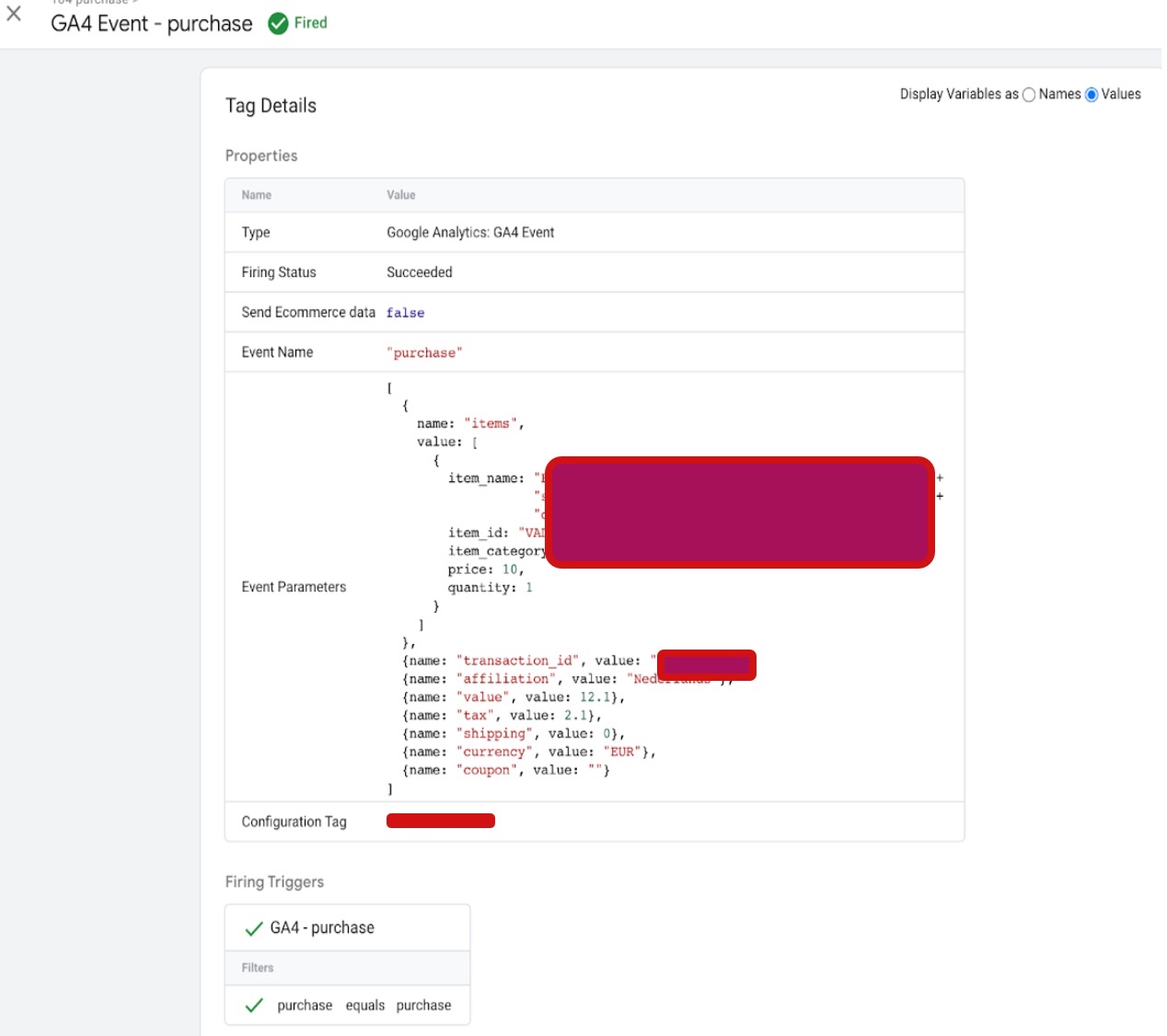
Migrate to Google Analytics 4 (GA4) Ecommerce Tracking

Standard

Migrating to Google Analytics 4 (GA4) Ecommerce tracking involves upgrading your existing Universal Analytics (UA) Ecommerce tracking implementation to the newer GA4 version. This allows you to take advantage of the enhanced features and capabilities of GA4, which include more advanced tracking of user behavior and improved integration with other Google marketing tools.

GA4 Ecommerce tracking offers several benefits over UA Ecommerce tracking, such as more detailed information on user engagement and conversion paths, better cross-device tracking, and improved data privacy controls. It also includes features like predictive analytics, machine learning, and enhanced data modeling that can help businesses gain deeper insights into their customer behavior and improve their ecommerce performance.

To migrate to GA4 Ecommerce tracking, you will need to set up a new GA4 property, enable Ecommerce tracking, configure your website or app to send enhanced Ecommerce data to GA4, set up product data, create conversion events, test your implementation, and launch your GA4 Ecommerce tracking. The process requires some technical knowledge and may involve updating your website or app code, but it’s worth the effort to take advantage of the advanced features and capabilities of GA4 Ecommerce tracking.

There are several reasons why businesses should consider migrating to Google Analytics 4 (GA4) Ecommerce tracking:

More advanced tracking of user behavior: GA4 Ecommerce tracking provides more detailed information on user engagement, including data on user behavior across multiple devices, channels, and touchpoints. This allows businesses to gain a more complete understanding of their customer journeys and make data-driven decisions to improve their ecommerce performance.

Improved data privacy controls: GA4 Ecommerce tracking includes enhanced data privacy controls that help businesses comply with data protection regulations like GDPR and CCPA. This includes features like data deletion on demand, user consent management, and data minimization.

Better integration with other Google marketing tools: GA4 Ecommerce tracking is designed to work seamlessly with other Google marketing tools like Google Ads, Google Tag Manager, and Firebase. This allows businesses to get a more complete view of their marketing performance and optimize their campaigns more effectively.

Machine learning and predictive analytics: GA4 Ecommerce tracking includes machine learning and predictive analytics capabilities that can help businesses identify new opportunities for growth and optimize their ecommerce operations. This includes features like automated insights and predictive metrics.

Future-proofing your analytics setup: As Google continues to develop and invest in GA4, it is likely that UA Ecommerce tracking will eventually be deprecated. By migrating to GA4 Ecommerce tracking now, businesses can future-proof their analytics setup and ensure that they are prepared for any upcoming changes.

Google Analytics 4 Migration Ecommerce Tracking

Migrate to Google Analytics 4 (GA4) Ecommerce Tracking using Google Tag Manager

Warning: If you don’t know about javascript or don’t have developing knowledge then don’t try to Migrate to Google Analytics 4 (GA4) Ecommerce Tracking using Google Tag Manager that can break your site, Cart and other functionality 

Disclaimer: Google tag manager belongs to Google property 

For Contact: mappchero@gmail.com

I am available for Hire on Freelancer: Freelancer.com

I am available for Hire on Upwork: Upwork.com

I am available for Hire on Peopleperhour: Peopleperhour.com

I am available for Hire on Guru: Guru.com
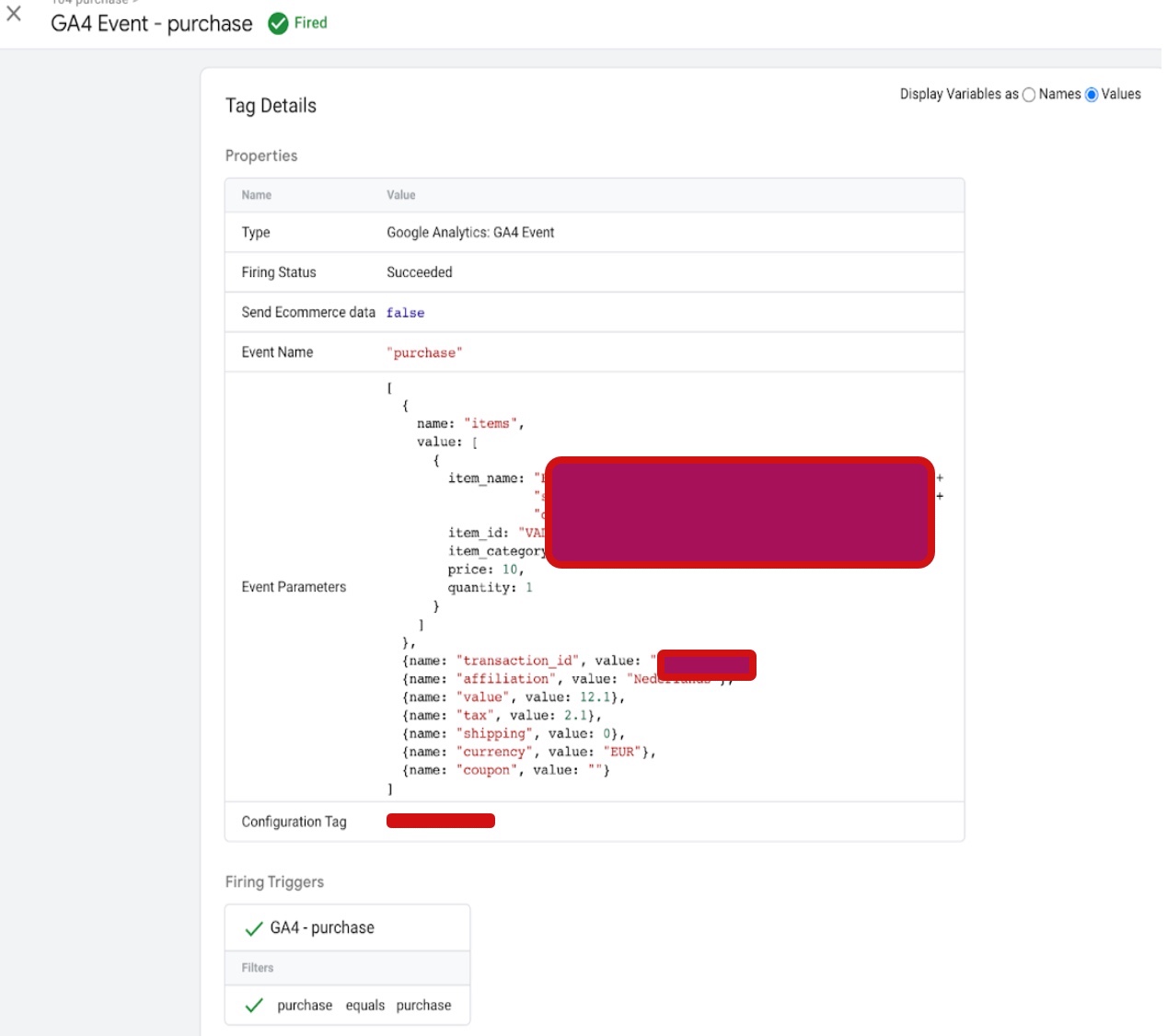
Google Analytics 4 Enhanced Ecommerce tracking

Standard

Google Analytics 4 (GA4) Enhanced Ecommerce tracking is a powerful feature that allows website owners and digital marketers to track and analyze customer behavior and purchase patterns on their website.

Google Analytics 4 (GA4) Enhanced Ecommerce tracking is a powerful tool that enables website owners and digital marketers to track and analyze customer behavior and purchase patterns on their ecommerce websites. With GA4 Enhanced Ecommerce tracking, you can monitor various ecommerce metrics such as product views, add-to-cart events, checkout behavior, and purchase transactions. By analyzing this data, you can gain valuable insights into your customers’ behavior and optimize your marketing campaigns, user experience, and ultimately increase revenue. GA4 Enhanced Ecommerce tracking also provides customizable ecommerce reports, including the Product Performance report, Sales Performance report, Shopping Behavior report, and Checkout Behavior report. These reports enable you to make data-driven decisions and improve your website’s performance. By implementing GA4 Enhanced Ecommerce tracking, you can gain a competitive advantage, boost your website’s SEO, and achieve your ecommerce goals.

With GA4 Enhanced Ecommerce tracking, you can track and analyze various ecommerce metrics, such as product views, add-to-cart events, checkout behavior, and purchase transactions. This data can help you identify opportunities to improve your website’s user experience, increase conversions, and optimize your marketing campaigns.

To set up Enhanced Ecommerce tracking in GA4, you need to first enable the feature in your GA4 property settings. Once enabled, you can use the GA4 Enhanced Ecommerce tracking code to track user behavior on your website.

You can also set up various ecommerce reports in GA4 to visualize and analyze your ecommerce data. These reports include the Product Performance report, Sales Performance report, Shopping Behavior report, and Checkout Behavior report. These reports can help you identify which products are performing well, which pages are leading to drop-offs in the checkout process, and other key insights into your ecommerce performance.

There are several reasons why you should implement Google Analytics 4 (GA4) Enhanced Ecommerce tracking on your website:

Detailed insights into customer behavior: GA4 Enhanced Ecommerce tracking allows you to track and analyze a wide range of customer behavior, including product views, add-to-cart events, checkout behavior, and purchase transactions. This data can help you understand how customers are interacting with your website and where they might be experiencing issues or barriers to purchase.

Optimized marketing campaigns: By tracking ecommerce metrics such as product revenue and conversion rates, you can identify which marketing channels and campaigns are driving the most sales and revenue. This data can help you optimize your marketing efforts and allocate your budget more effectively.

Improved user experience: By analyzing customer behavior and identifying areas where customers are dropping off or abandoning their carts, you can make targeted improvements to your website’s user experience. This can help reduce bounce rates, increase conversions, and ultimately drive more revenue.

Enhanced reporting capabilities: GA4 Enhanced Ecommerce tracking provides a range of customizable ecommerce reports, including the Product Performance report, Sales Performance report, Shopping Behavior report, and Checkout Behavior report. These reports can help you gain valuable insights into your ecommerce performance and make data-driven decisions to improve your website’s performance.

Set up ecommerce events for Enhanced Ecommerce tracking

Google Analytics 4 (GA4) Enhanced Ecommerce Tracking using Google Tag Manager

Warning: If you don’t know about javascript or don’t have developing knowledge then don’t try to Google Analytics 4 (GA4) Enhanced Ecommerce tracking using Google Tag Manager that can break your site, Cart and other functionality 

Disclaimer: Google tag manager belongs to Google property 

For Contact: mappchero@gmail.com

I am available for Hire on Freelancer: Freelancer.com

I am available for Hire on Upwork: Upwork.com

I am available for Hire on Peopleperhour: Peopleperhour.com

I am available for Hire on Guru: Guru.com
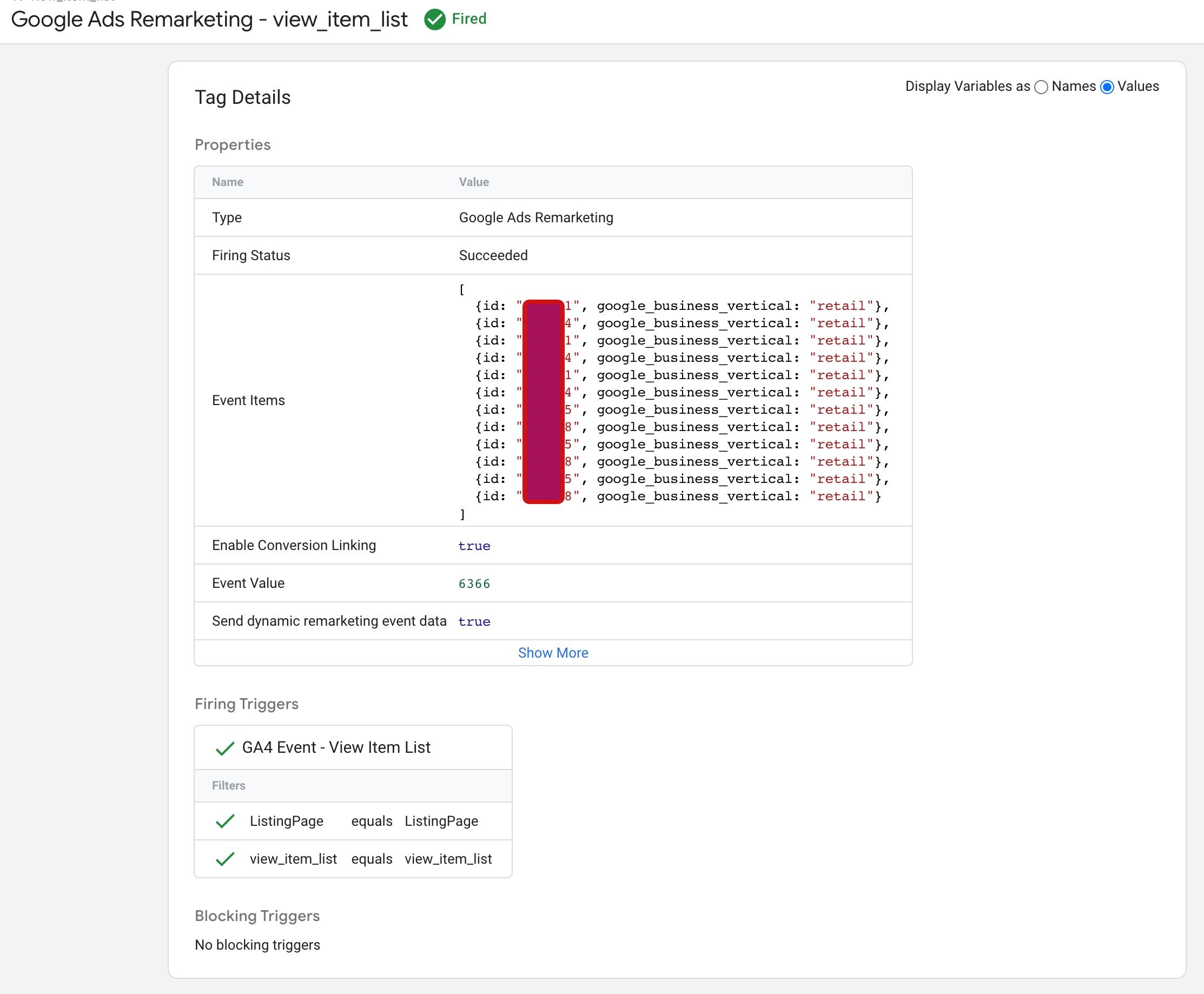
Magento 2 Google Ads Dynamic Remarketing Tag Tracking using Google Tag Manager

Standard

Magento 2 Google Ads Dynamic Remarketing Tracking is a feature that allows online merchants using the Magento 2 platform to set up and track Dynamic Remarketing campaigns on Google Ads. Dynamic remarketing allows you to show personalized ads to users who have visited your website, viewed specific products, or abandoned their shopping cart.

The Google Ads Dynamic Remarketing is a piece of code that tracks the behavior of users on your website, such as the products they viewed, added to their cart, and purchased. This information is used to create targeted ads that appear on the Google Display Network to remind users of products they showed interest in or abandoned in their cart.

By setting up Google Ads Dynamic Remarketing Tracking in Magento 2, online merchants can leverage the power of dynamic Remarketing to drive more sales and increase their return on investment (ROI) from Google Ads.

There are several benefits of using Magento 2 Google Ads Dynamic Remarketing Tracking:

Personalized Ads: Dynamic Remarketing allows you to create personalized ads based on users’ behavior on your website. This helps to increase the relevance of your ads, which can lead to higher click-through rates (CTR) and conversion rates.

Increased ROI: By targeting users who have already shown interest in your products, you are more likely to convert them into paying customers. This can lead to an increased return on investment (ROI) from your Google Ads campaigns.

Higher Engagement: Dynamic Remarketing ads are more engaging than standard display ads because they feature products that users have already shown interest in. This can lead to higher engagement rates and a better user experience.

Cost-Effective: Dynamic Remarketing ads are often more cost-effective than other types of advertising because they target users who have already shown interest in your products. This can lead to a higher ROI and lower cost per acquisition (CPA).

Easy Implementation: Magento 2 Google Ads Dynamic Remarketing Tracking is easy to implement and can be set up in just a few steps. Once set up, the tag will automatically track user behavior on your website and allow you to create targeted ads based on that behavior.

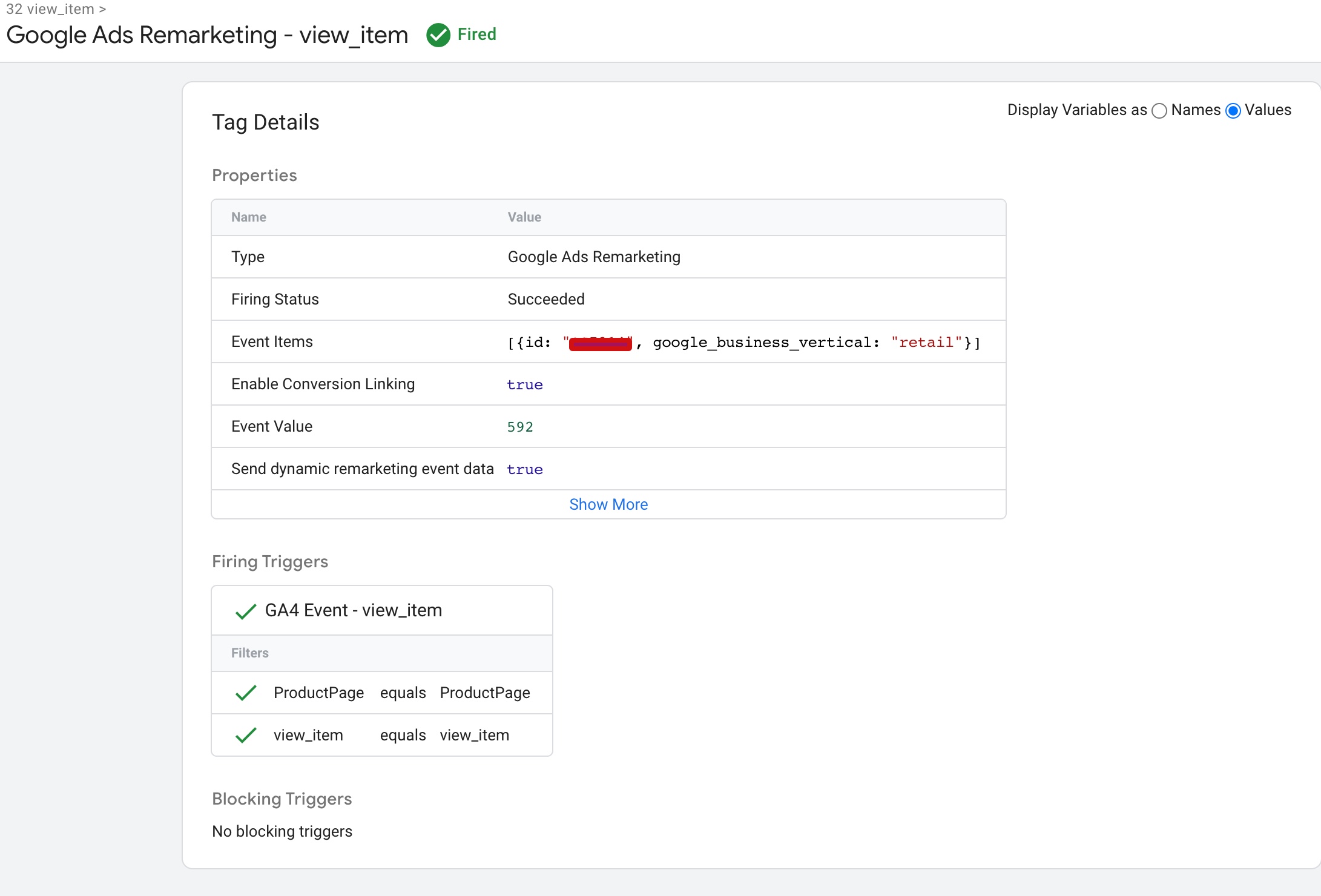
The “view_item_list” dynamic remarketing event in Magento 2 is used to track when a user views a category page on your website. This event sends data to Google Analytics about the products displayed on the category page, including their ID, name, category, brand (if applicable), price, and list (the name of the category page).

Dynamic Remarketing Setup for Google Ads

Google Ads Dynamic Remarketing Magento 2 using Google Tag Manager

The “view_item” dynamic remarketing event in Magento 2 is used to track when a user views a product page on your website. This event sends data to Google Analytics about the product that was viewed, including its ID, name, category, brand (if applicable), price, and variant (if applicable).

Google Dynamic Remarketing Tag Magento 2

Magento 2 Google Adwords Dynamic Remarketing Tag Tracking using Google Tag Manager

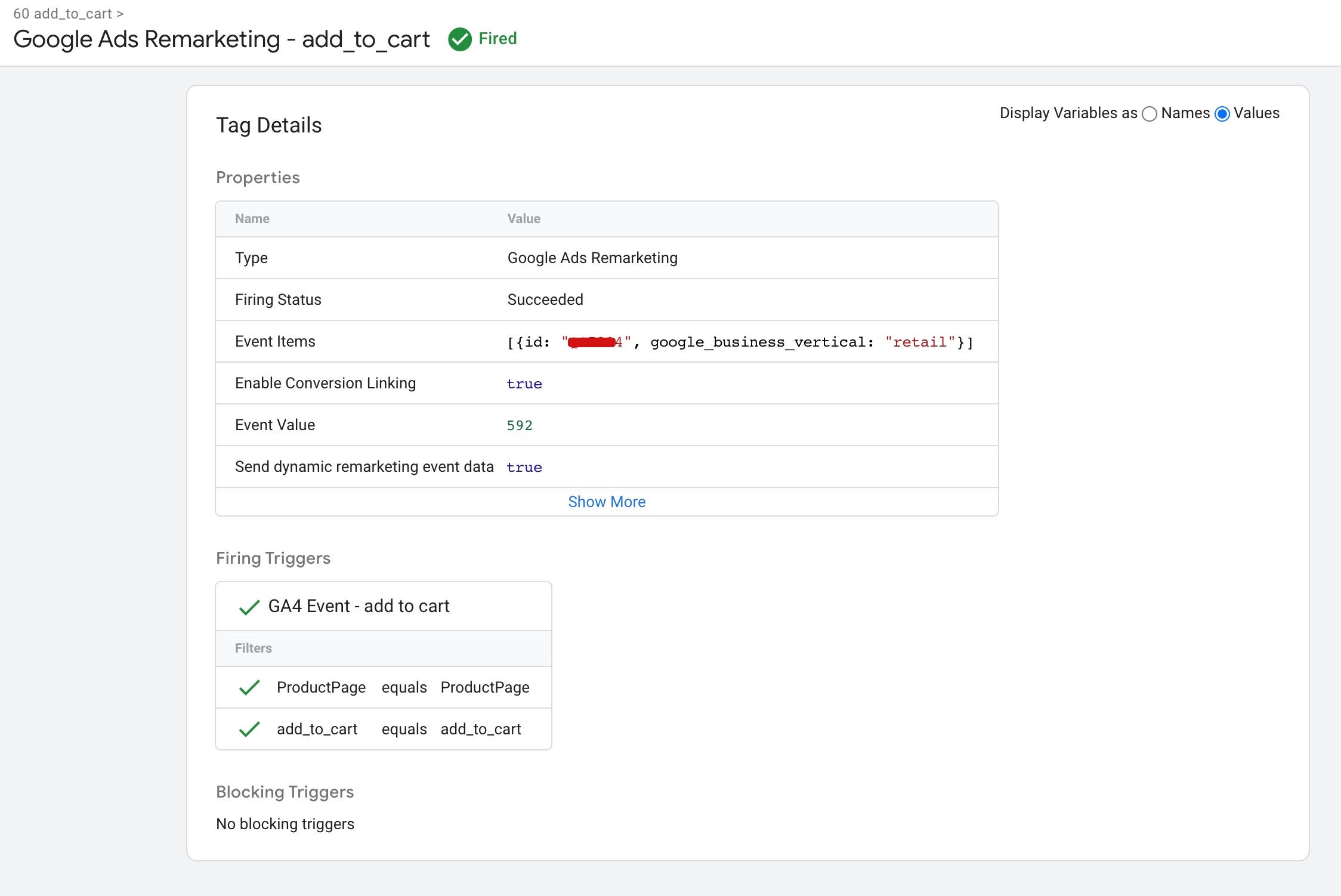
The “add_to_cart” dynamic remarketing event in Magento 2 is used to track when a user adds a product to their cart on your website. This event sends data to Google Analytics about the product that was added to the cart, including its ID, name, category, brand (if applicable), price, and quantity.

Configure Google Ads Dynamic Remarketing in Magento 2

Dynamic Remarketing tag on your Magento 2 using Google Tag Manager

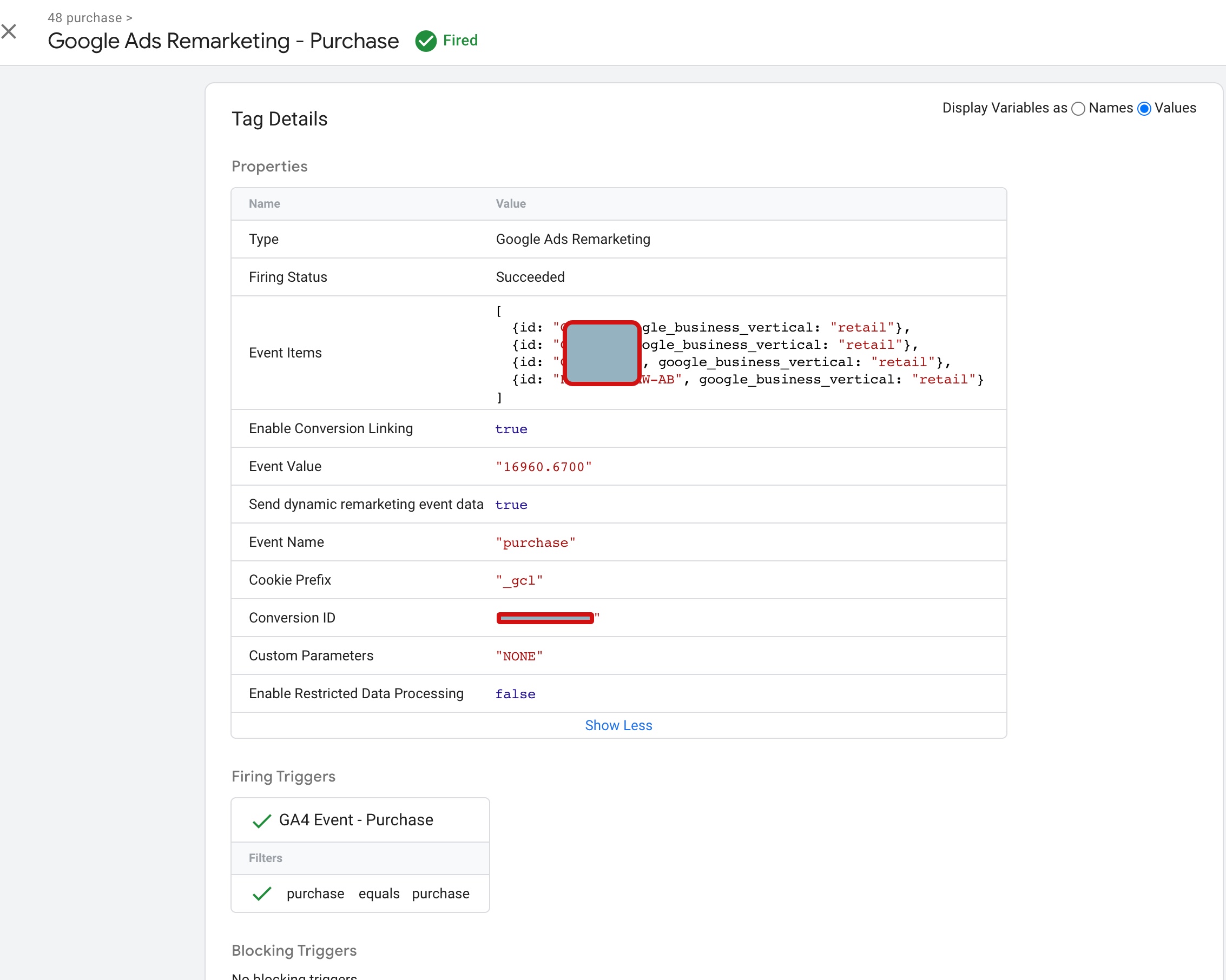
The “purchase” dynamic remarketing event in Magento 2 is used to track when a user completes a purchase on your website. This event sends data to Google Analytics about the products that were purchased, including their IDs, names, categories, brands (if applicable), prices, and quantities.

Setting Up Dynamic Remarketing for Magento 2

Magento 2 Dynamic Remarketing Tag Setup for Google Ads using Google Tag Manager

Warning: If you don’t know about javascript or don’t have developing knowledge then don’t try to Magento 2 Google Ads Dynamic Remarketing Tag Tracking using Google Tag Manager that can break your site, Cart and other functionality 

Disclaimer: Google tag manager belongs to Google property 

For Contact: mappchero@gmail.com

I am available for Hire on Freelancer: Freelancer.com

I am available for Hire on Upwork: Upwork.com

I am available for Hire on Peopleperhour: Peopleperhour.com

I am available for Hire on Guru: Guru.com
Google Analytics 4 (GA4) Enhanced Ecommerce Tracking

Standard

Google Analytics 4 (GA4) eCommerce tracking is a feature of Google Analytics 4 that allows website owners to track and analyze eCommerce activity on their website. It provides a more advanced and accurate way to measure user behavior and revenue for online businesses.

With GA4 eCommerce tracking, you can monitor user behavior throughout the entire eCommerce process, from product browsing to checkout and purchase. This includes tracking metrics such as product views, add-to-cart events, checkout steps, and completed purchases. You can also track other important eCommerce metrics, such as revenue, average order value, and conversion rate.

GA4 eCommerce tracking provides several benefits, including:

Improved accuracy: GA4 eCommerce tracking provides more accurate data on user behavior and revenue compared to previous versions of Google Analytics.

Deeper insights: With GA4 eCommerce tracking, you can gain deeper insights into user behavior and customer journeys, helping you optimize your eCommerce website and improve your revenue.

Cross-device tracking: GA4 eCommerce tracking allows you to track user behavior across multiple devices, providing a more complete view of user behavior and customer journeys.

Integration with Google Ads: GA4 eCommerce tracking integrates with Google Ads, allowing you to track the effectiveness of your Google Ads campaigns and optimize your ad spend.

Integration with Google BigQuery: GA4 eCommerce tracking integrates with Google BigQuery, allowing you to export your data to BigQuery for more advanced analysis and reporting.

Here are some benefits of using Google Tag Manager (GTM) for implementing Google Analytics 4 (GA4) eCommerce tracking:

Simplified Implementation: GTM simplifies the process of implementing GA4 eCommerce tracking by allowing you to add and manage tags without having to modify the code on your website.

Flexible Tracking: GTM offers a range of built-in and custom tags that allow you to track a variety of eCommerce events, such as product impressions, add to cart, checkout steps, and completed purchases.

Customization: GTM provides a high degree of customization, allowing you to define your own eCommerce events and trigger rules based on user behavior on your website.

Debugging: GTM includes a preview and debug mode that allows you to test and troubleshoot your GA4 eCommerce tracking implementation before it goes live on your website.

Enhanced Performance: GTM can improve the performance of your website by loading tags asynchronously, which means that they don’t slow down your website’s loading speed.

Data Layer: GTM’s data layer feature provides a way to organize and standardize the data that is sent to GA4, making it easier to analyze and understand user behavior on your website.

Better Insights: With GA4 eCommerce tracking implemented through GTM, you can gain better insights into user behavior and eCommerce performance, helping you make data-driven decisions to improve conversions and revenue on your website.

Google Analytics 4 (GA4) eCommerce tracking

Google Analytics 4 (GA4) with Enhanced eCommerce using Google Tag Manager

Warning: If you don’t know about javascript or don’t have developing knowledge then don’t try to Google Analytics 4 (GA4) Enhanced Ecommerce Tracking that can break your site, Cart and other functionality 

Disclaimer: Google tag manager belongs to Google property 

For Contact: mappchero@gmail.com

I am available for Hire on Freelancer: Freelancer.com

I am available for Hire on Upwork: Upwork.com

I am available for Hire on Peopleperhour: Peopleperhour.com

I am available for Hire on Guru: Guru.com
GA4 Migration for Enhanced eCommerce & Advanced Event Tracking

Standard

GA4 migration for enhanced eCommerce and advanced event tracking refers to the process of upgrading your existing Universal Analytics tracking to the newer Google Analytics 4 (GA4) tracking method in order to take advantage of the enhanced eCommerce and advanced event tracking features available in GA4.

Enhanced eCommerce tracking in GA4 provides more detailed and accurate information about customer behavior and purchasing patterns on your website or app, which can help you make more informed business decisions. It allows you to track product impressions, clicks, views, purchases, refunds, and more.

Advanced event tracking in GA4 enables you to track custom events on your website or app that are not included in the default event tracking. This allows you to track specific user interactions with your site or app, such as form submissions, button clicks, or video plays.

Migrating to GA4 involves creating a new GA4 property in your Google Analytics account, enabling enhanced eCommerce and advanced event tracking, updating your tracking code, mapping your existing events to the new event names in GA4, and setting up custom events. Once you have completed the migration, you can start using the enhanced eCommerce and advanced event tracking features in GA4 to gain deeper insights into your customers’ behavior and optimize your business strategy accordingly.

There are several benefits of GA4 migration for enhanced eCommerce and advanced event tracking. Here are some of the key benefits:

Enhanced eCommerce tracking: GA4’s enhanced eCommerce tracking provides more detailed and accurate information about customer behavior and purchasing patterns on your website or app. This allows you to make more informed business decisions and optimize your website or app to improve the customer experience.

Advanced event tracking: With GA4’s advanced event tracking, you can track custom events on your website or app that are not included in the default event tracking. This allows you to track specific user interactions with your site or app, such as form submissions, button clicks, or video plays, and gain deeper insights into your customers’ behavior.

More accurate data: GA4’s event tracking model is based on events rather than sessions, which means that it provides more accurate data on user behavior. This is because events allow you to track individual actions taken by users, rather than just tracking sessions as a whole.

Better cross-device tracking: GA4 provides better cross-device tracking, which allows you to track user behavior across multiple devices and platforms. This means that you can get a more complete view of your customers’ behavior and preferences.

Improved machine learning capabilities: GA4 includes advanced machine learning capabilities that can help you identify trends and patterns in your data, and make predictions about future customer behavior. This can help you make more informed business decisions and optimize your website or app accordingly.

Great! I’d be happy to assist you with GA4 migration for enhanced eCommerce and advanced event tracking. Here are the steps you can follow:

Create a new GA4 property: If you haven’t already, create a new GA4 property in your Google Analytics account. You can do this by going to the admin section of your Google Analytics account, clicking on the “Create Property” button, and selecting “GA4 property”.

Set up enhanced eCommerce: To set up enhanced eCommerce tracking, you’ll need to enable it in your GA4 property settings. Go to the “Data Streams” section of your GA4 property, click on your data stream, and then click on “Configure Enhanced Measurement”. From there, you can enable enhanced eCommerce tracking.

Update your tracking code: Once you’ve enabled enhanced eCommerce tracking, you’ll need to update your tracking code to include the new parameters. You can find the updated tracking code in the “Tagging” section of your GA4 property settings.

Migrate your existing events: If you’re already tracking events in your Universal Analytics property, you’ll need to migrate them to your new GA4 property. You can do this by mapping your existing event categories, actions, and labels to the new event names in your GA4 property.

Set up custom events: GA4 also allows you to track custom events that aren’t included in the default event tracking. You can set up custom events by defining them in your GA4 property settings and updating your tracking code to include the new event parameters.

Test your tracking: Once you’ve set up enhanced eCommerce tracking and migrated your events, it’s important to test your tracking to make sure everything is working correctly. You can use the Google Analytics Debugger Chrome extension to check if your events are firing correctly.

GA4 Migration for Enhanced eCommerce

Upgrade To Google Analytics 4 (GA4) Migration for Enhanced eCommerce using Google Tag Manager

Warning: If you don’t know about javascript or don’t have developing knowledge then don’t try to GA4 Migration for Enhanced eCommerce & Advanced Event Tracking that can break your site, Cart and other functionality 

Disclaimer: Google tag manager belongs to Google property 

For Contact: mappchero@gmail.com

I am available for Hire on Freelancer: Freelancer.com

I am available for Hire on Upwork: Upwork.com

I am available for Hire on Peopleperhour: Peopleperhour.com

I am available for Hire on Guru: Guru.com
Google Analytics 4 (GA4) Integration Enhanced Ecommerce with Magneto 2

Standard

Google Analytics 4 (GA4) Integration Enhanced Ecommerce with Magento 2 is a method of integrating GA4 with a Magento e-commerce website to track user behavior and conversion events.

Enhanced Ecommerce is a feature of GA4 that provides insights into the entire e-commerce sales funnel, from product views to purchases. By integrating GA4 Enhanced Ecommerce with Magento, online store owners can get a better understanding of customer behavior and optimize their sales funnel accordingly.

The integration involves adding the GA4 tracking code to your Magento 2 store, setting up data layer variables to track product impressions, clicks, and purchases, and configuring the GA4 Enhanced Ecommerce settings in the Google Analytics interface.

Once the integration is set up, store owners can use GA4 to track various e-commerce metrics, such as product performance, revenue, and conversion rates. They can also set up custom reports and analyze customer behavior to optimize the shopping experience and increase sales.

Google Analytics 4 (GA4) Integration Enhanced Ecommerce with Magento using Google Tag Manager is a method of setting up GA4 Enhanced Ecommerce tracking on a Magento 2 e-commerce website through Google Tag Manager (GTM).

Google Tag Manager is a free tool that allows you to manage and deploy various tracking and marketing tags on your website without requiring any code changes. By using GTM, you can easily set up and configure GA4 Enhanced Ecommerce tracking on your Magento 2 store.

To set up GA4 Integration Enhanced Ecommerce with Magento 2 using GTM, you need to follow these steps:

  1. Set up a GA4 property and obtain the measurement ID.

2. Install the GTM container code on your Magento 2 website.

3. Create a GA4 tag in GTM and configure it to track Enhanced Ecommerce data.

4. Set up data layer variables on your Magento 2 website to capture product information and other Enhanced Ecommerce data.

5. Configure triggers in GTM to fire the GA4 tag when certain events occur on your website, such as product views, clicks, and purchases.

Once you have completed these steps, you should be able to see Enhanced Ecommerce data in your GA4 reports, including product performance, revenue, and conversion rates. You can use this data to optimize your sales funnel and improve the customer experience on your Magento store.

Google Analytics 4 (GA4) Integration Enhanced Ecommerce with Magento using Google Tag Manager is a method of setting up GA4 Enhanced Ecommerce tracking on a Magento e-commerce website through Google Tag Manager (GTM).

Google Tag Manager is a free tool that allows you to manage and deploy various tracking and marketing tags on your website without requiring any code changes. By using GTM, you can easily set up and configure GA4 Enhanced Ecommerce tracking on your Magento store.

To set up GA4 Integration Enhanced Ecommerce with Magento 2 using GTM, you need to follow these steps:

  1. Set up a GA4 property and obtain the measurement ID.

2. Install the GTM container code on your Magento  2 website.

3. Create a GA4 tag in GTM and configure it to track Enhanced Ecommerce data.

4. Set up data layer variables on your Magento 2 website to capture product information and other Enhanced Ecommerce data.

5. Configure triggers in GTM to fire the GA4 tag when certain events occur on your website, such as product views, clicks, and purchases.

Once you have completed these steps, you should be able to see Enhanced Ecommerce data in your GA4 reports, including product performance, revenue, and conversion rates. You can use this data to optimize your sales funnel and improve the customer experience on your Magento 2 store.

view_item_list” is a GA4 event in Magento 2 that tracks when a customer views a list of products on the website, such as a category or search results page. This event fires when a product list page is loaded and can capture information such as the list name, the list position of each product, and the product details.

Magento 2 Google Analytics 4 (GA4)

Migration Enhanced Ecommerce GA4 Magento 2 using Google Tag manager

view_item” is a GA4 event in Magento 2 that tracks when a customer views a product on the website. This event fires when a product page is loaded and can capture information such as the product name, category, ID, and price.

GA4 Integration Enhanced Ecommerce with Magneto 2

Google Analytics 4 (GA4) Enhanced Ecommerce Tracking using Google Tag Manager

“add_to_cart” is a GA4 event in Magento 2 that tracks when a customer adds a product to their cart. This event fires when a customer clicks the “Add to Cart” button on a product page or product list page and can capture information such as the product name, ID, quantity, and price.

Migrate to Google Analytics 4 (GA4) for Magento 2

Google Analytics 4 (GA4) Integration for Magento 2 using Google Tag Manager

add_to_wishlist” is a GA4 event in Magento 2 that tracks when a customer adds a product to their wishlist. This event fires when a customer clicks the “Add to Wishlist” button on a product page or product list page and can capture information such as the product name, ID, and price.

GA4 Integration For Magento 2

Add Google Analytics 4 (GA4) With Magento 2 for Enhanced Ecommerce with Magneto 2

“View_cart” is an event in Google Analytics 4 (GA4) that tracks when a user views their shopping cart on an e-commerce website. In Magento 2, view_cart GA4 tracking can be implemented using Google Tag Manager (GTM) to capture this event and send the data to your GA4 account.

magento 2 google analytics 4 (GA4) ecommerce tracking

Google Tag Manager (GTM) for Magento 2 for GA4 Ecommerce Tracking

“Remove_from_cart” is an event in Google Analytics 4 (GA4) that tracks when a user removes a product from their shopping cart on an e-commerce website. In Magento 2, remove_from_cart GA4 tracking can be implemented using Google Tag Manager (GTM) to capture this event and send the data to your GA4 account.

GA4 Integration For Magento 2

Set up Google Analytics 4 (GA4) eCommerce tracking in Magento 2 using Google Tag Manager

“Begin_checkout” is an event in Google Analytics 4 (GA4) that tracks when a user starts the checkout process on an e-commerce website. In Magento 2, begin_checkout GA4 tracking can be implemented using Google Tag Manager (GTM) to capture this event and send the data to your GA4 account.

Magento 2 Google Analytics 4 (GA4) Enhanced eCommerce

Implement Google Analytics 4 (GA4) eCommerce on Magento 2 using Google Tag Manager

Add_shipping_info” is an event in Google Analytics 4 (GA4) that tracks when a user enters their shipping information during the checkout process on an e-commerce website. In Magento 2, add_shipping_info GA4 tracking can be implemented using Google Tag Manager (GTM) to capture this event and send the data to your GA4 account.

Magento 2 Enhanced eCommerce for GA4

Magento 2 Google Analytics 4 (GA4) Enhanced eCommerce using Google Tag Manager

Add_payment_info” is an event in Google Analytics 4 (GA4) that tracks when a user enters their payment information during the checkout process on an e-commerce website. In Magento 2, add_payment_info GA4 tracking can be implemented using Google Tag Manager (GTM) to capture this event and send the data to your GA4 account.

magento 2 google analytics 4 (GA4)

Google Analytic 4 (GA4) Magento 2 Enhanced Ecommerce Data With Google Tag Manager

purchase” is an event in Google Analytics 4 (GA4) that tracks when a user completes a purchase on an e-commerce website. In Magento 2, purchase GA4 tracking can be implemented using Google Tag Manager (GTM) to capture this event and send the data to your GA4 account.

Implement Google Analytics 4 (GA4) on Magento 2

Google Analytics 4 (GA4) For Magento Ecommerce Tracking Purchase Tracking using Google Tag Manager

Warning: If you don’t know about javascript or don’t have developing knowledge then don’t try to Google Analytics 4 (GA4) Integration Enhanced Ecommerce with Magneto 2 that can break your site, Cart and other functionality 

Disclaimer: Google tag manager belongs to Google property 

For Contact: mappchero@gmail.com

I am available for Hire on Freelancer: Freelancer.com

I am available for Hire on Upwork: Upwork.com

I am available for Hire on Peopleperhour: Peopleperhour.com

I am available for Hire on Guru: Guru.com